api
High-level API for bpf4
The API allows a high-level and flexible interface to the core of bpf4, which is implemented in cython for efficiency.
API vs core
These three curves, a, b and c define the same linear break-point-function The first two definitions, a and b, use the high-level API, which allows for points to be defined as a flat sequence, as tuples of (x, y). The core classes need to be instantiated with two arrays of x and y values, as in c
from bpf4 import *
a = linear(0, 0, 1, 2.5, 3, 10)
b = linear((0, 0), (1, 2.5), (3, 10))
c = core.Linear([0, 1, 3], [0, 2.5, 10])
| Function | Description |
|---|---|
blendshape |
Create a bpf blending two interpolation forms |
const |
A bpf which always returns a constant value |
expon |
Construct an Expon bpf (a bpf with exponential interpolation) |
halfcos |
Construct a half-cosine bpf (a bpf with half-cosine interpolation) |
halfcosexp |
Construct a half-cosine bpf (a bpf with half-cosine interpolation) |
halfcosm |
Halfcos interpolation with symmetric exponent |
linear |
Construct a Linear bpf. |
multi |
A bpf with a per-pair interpolation |
nearest |
A bpf with floor interpolation |
nointerpol |
A bpf with floor interpolation |
pchip |
Monotonic Cubic Hermite Intepolation |
slope |
Generate a straight line with the given slope and offset |
smooth |
A bpf with smoothstep interpolation. |
smoother |
A bpf with smootherstep interpolation |
spline |
Construct a cubic-spline bpf |
stack |
A bpf representing a stack of bpf |
uspline |
Construct a univariate cubic-spline bpf |
blendshape
def blendshape(shape0: str, shape1: str, mix: float | core.BpfInterface, points
               ) -> core.BpfInterface
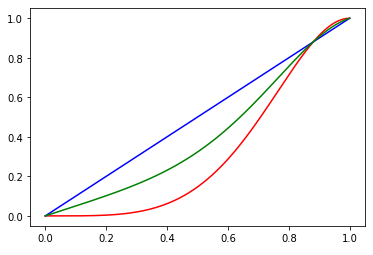
Create a bpf blending two interpolation forms
Example
from bpf4 import *
a = blendshape('halfcos(2.0)', 'linear', mix=0.5, points=(0, 0, 1, 1))
halfcos(0, 0, 1, 1, exp=2).plot(color='red')
linear(0, 0, 1, 1).plot(color='blue')
a.plot(color='green')
Args
- shape0 (
str): a description of the first interpolation - shape1 (
str): a description of the second interpolation - mix (
float | core.BpfInterface): blend factor. A value between 0 (use onlyshape0) and 1 (use onlyshape1). A value of0.5will result in an average between the first and second interpolation kind. Can be a bpf itself, returning the mix value at any x value - points: either a tuple
(x0, y0, x1, y1, ...)or a tuple(xs, ys)where xs and ys are lists/arrays containing the x and y coordinates of the points
Returns
(core.BpfInterface) A bpf blending two different interpolation kinds
const
def const(value) -> core.Const
A bpf which always returns a constant value
Example
>>> c5 = const(5)
>>> c5(10)
5
Args
- value: the constant value
expon
def expon(args, kws) -> core.Expon
Construct an Expon bpf (a bpf with exponential interpolation)
A bpf can be constructed in multiple ways:
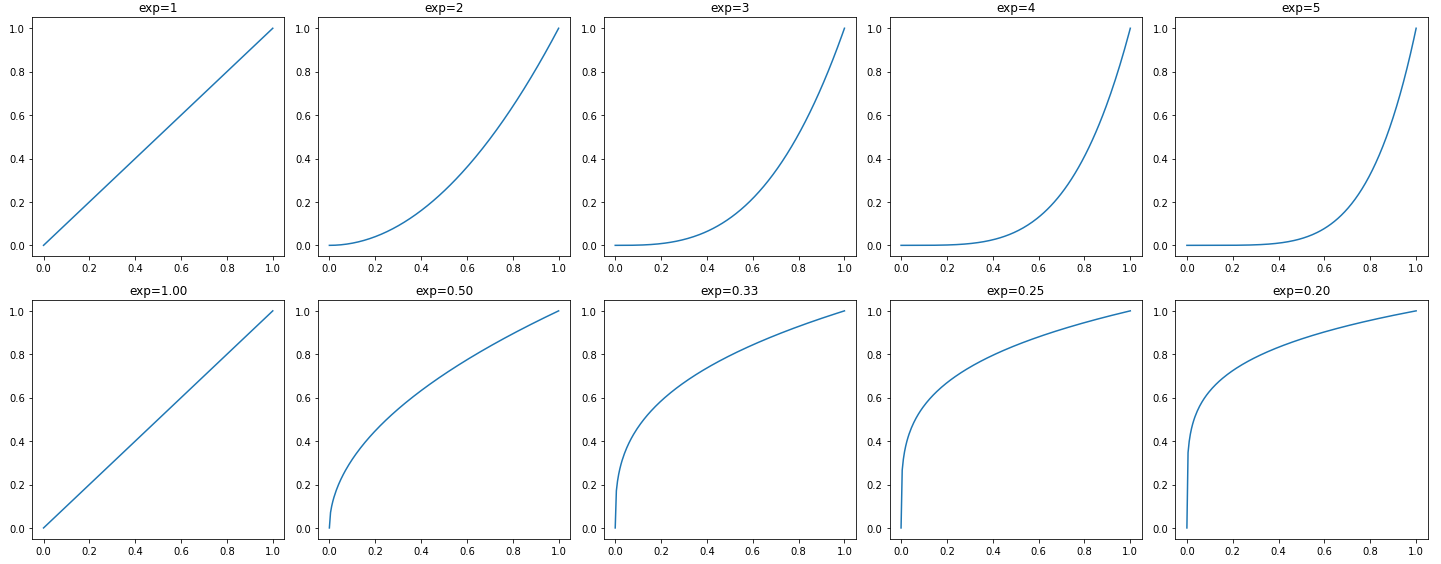
expon(x0, y0, x1, y1, ..., exp=exponent)
expon(exponent, x0, y0, x1, y1, ...)
expon((x0, y0), (x1, y1), ..., exp=exponent)
expon({x0:y0, x1:y1, ...}, exp=exponent)
Example
from bpf4 import *
import matplotlib.pyplot as plt
numplots = 5
fig, axs = plt.subplots(2, numplots, tight_layout=True, figsize=(20, 8))
for i in range(numplots):
    exp = i+1
    expon(0, 0, 1, 1, exp=exp).plot(show=False, axes=axs[0, i])
    expon(0, 0, 1, 1, exp=1/exp).plot(show=False, axes=axs[1, i])
    axs[0, i].set_title(f'{exp=}')
    axs[1, i].set_title(f'exp={1/exp:.2f}')

plot.show()
Args
- args: either a flat list of coordinates in the form
x0, y0, x1, y1, ..., a list of tuples(x0, y0), (x1, y1), ..., a dict{x0:y0, x1:y1, ...}or two arraysxsandys - kws:
halfcos
def halfcos(args, exp: int = 1, numiter: int = 1, kws) -> core.Halfcos
Construct a half-cosine bpf (a bpf with half-cosine interpolation)
A bpf can be constructed in multiple ways:
halfcos(x0, y0, x1, y1, ...)
halfcos((x0, y0), (x1, y1), ...)
halfcos({x0:y0, x1:y1, ...})
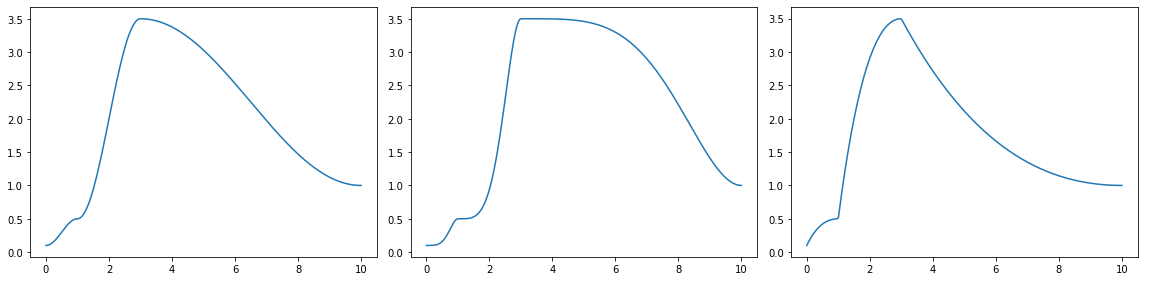
a = halfcos([0, 1, 3, 10], [0.1, 0.5, 3.5,  1])
b = halfcos(*a.points(), exp=2)
c = halfcos(*a.points(), exp=0.5)
fig, axes = plt.subplots(1, 3, figsize=(16, 4), tight_layout=True)
a.plot(axes=axes[0], show=False)
b.plot(axes=axes[1], show=False)
c.plot(axes=axes[2])
Args
- args: either a flat list of coordinates in the form
x0, y0, x1, y1, ..., a list of tuples(x0, y0), (x1, y1), ..., a dict{x0:y0, x1:y1, ...}or two arraysxsandys - exp (
int): the exponent to use (default:1) - numiter (
int): Number of iterations. A higher number accentuates the effect (default:1) - kws:
halfcos
def halfcos(args, exp: int = 1, numiter: int = 1, kws) -> core.Halfcos
Construct a half-cosine bpf (a bpf with half-cosine interpolation)
A bpf can be constructed in multiple ways:
halfcos(x0, y0, x1, y1, ...)
halfcos((x0, y0), (x1, y1), ...)
halfcos({x0:y0, x1:y1, ...})
a = halfcos([0, 1, 3, 10], [0.1, 0.5, 3.5,  1])
b = halfcos(*a.points(), exp=2)
c = halfcos(*a.points(), exp=0.5)
fig, axes = plt.subplots(1, 3, figsize=(16, 4), tight_layout=True)
a.plot(axes=axes[0], show=False)
b.plot(axes=axes[1], show=False)
c.plot(axes=axes[2])
Args
- args: either a flat list of coordinates in the form
x0, y0, x1, y1, ..., a list of tuples(x0, y0), (x1, y1), ..., a dict{x0:y0, x1:y1, ...}or two arraysxsandys - exp (
int): the exponent to use (default:1) - numiter (
int): Number of iterations. A higher number accentuates the effect (default:1) - kws:
halfcosm
def halfcosm(args, kws) -> core.Halfcosm
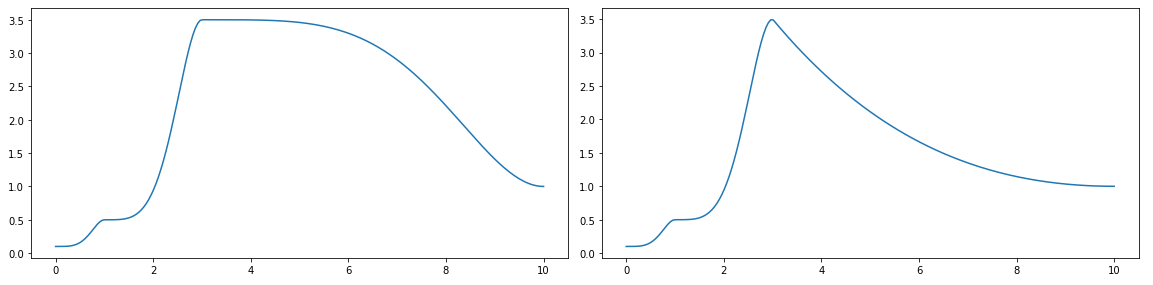
Halfcos interpolation with symmetric exponent
When used with an exponent, the exponent is inverted for downwards
segments (y1 > y0)
A bpf can be constructed in multiple ways:
halfcosm(x0, y0, x1, y1, ..., exp=2.0)
halfcosm(2.0, x0, y0, x1, y1, ...)    # The exponent can be placed first
halfcosm((x0, y0), (x1, y1), ...)
halfcosm({x0:y0, x1:y1, ...})
from bpf4 import *
a = halfcosm(0, 0.1,
             1, 0.5,
             3, 3.5,
             10, 1, exp=2)
b = halfcosm(*a.points(), exp=2)
fig, axes = plt.subplots(1, 2, figsize=(16, 4))
a.plot(axes=axes[0], show=False)
b.plot(axes=axes[1])
Args
- args: either a flat list of coordinates in the form
x0, y0, x1, y1, ..., a list of tuples(x0, y0), (x1, y1), ..., a dict{x0:y0, x1:y1, ...}or two arraysxsandys - kws:
Returns
(core.Halfcosm) A bpf with symmetric cosine interpolation
linear
def linear(args) -> core.Linear
Construct a Linear bpf.
A bpf can be constructed in multiple ways, all of which result in the same Linear instance:
linear(x0, y0, x1, y1, ...)
linear((x0, y0), (x1, y1), ...)
linear({x0:y0, x1:y1, ...})
Example
from bpf4 import *
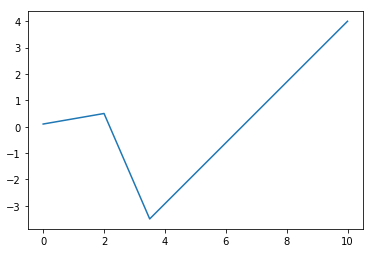
a = linear([0, 2, 3.5, 10], [0.1, 0.5, -3.5,  4])
a.plot()
Args
- args: either a flat list of coordinates in the form
x0, y0, x1, y1, ..., a list of tuples(x0, y0), (x1, y1), ..., a dict{x0:y0, x1:y1, ...}or two arraysxsandys
multi
def multi(args) -> None
A bpf with a per-pair interpolation
Example
# (0,0) --linear-- (1,10) --expon(3)-- (2,3) --expon(3)-- (10, -1) --halfcos-- (20,0)

multi(0, 0,   'linear'
      1, 10,  'expon(3)',
      2, 3,   # assumes previous interpolation
      10, -1, 'halfcos'
      20, 0)

# also the following syntax is possible
multi((0, 0, 'linear')
      (1, 10, 'expon(3)'),
      (2, 3),
      (10, -1, 'halfcos'),
      (20, 0))
Args
- args:
nearest
def nearest(args) -> core.Nearest
A bpf with floor interpolation
A bpf can be constructed in multiple ways:
nearest(x0, y0, x1, y1, ...)
nearest((x0, y0), (x1, y1), ...)
nearest({x0:y0, x1:y1, ...})
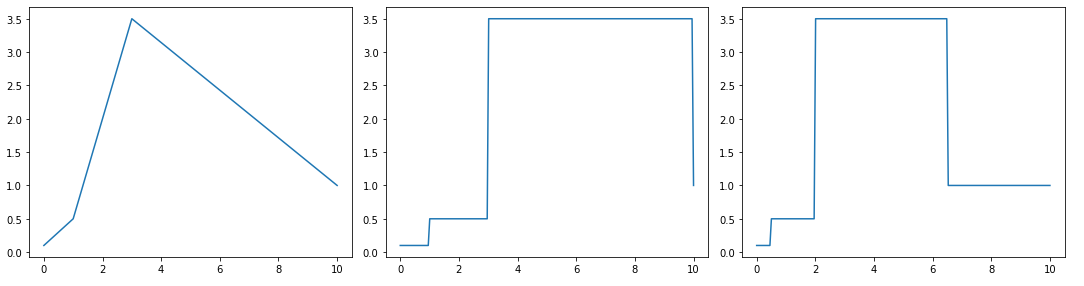
a = linear([0, 1, 3, 10], [0.1, 0.5, 3.5,  1])
b = nointerpol(*a.points())
c = nearest(*a.points())
fig, axes = plt.subplots(1, 3, figsize=(15, 4), tight_layout=True)
a.plot(axes=axes[0], show=False)
b.plot(axes=axes[1], show=False)
c.plot(axes=axes[2])
Args
- args: either a flat list of coordinates in the form
x0, y0, x1, y1, ..., a list of tuples(x0, y0), (x1, y1), ..., a dict{x0:y0, x1:y1, ...}or two arraysxsandys
nointerpol
def nointerpol(args) -> core.NoInterpol
A bpf with floor interpolation
A bpf can be constructed in multiple ways:
nointerpol(x0, y0, x1, y1, ...)
nointerpol((x0, y0), (x1, y1), ...)
nointerpol({x0:y0, x1:y1, ...})
a = linear([0, 1, 3, 10], [0.1, 0.5, 3.5,  1])
b = nointerpol(*a.points())
c = nearest(*a.points())
fig, axes = plt.subplots(1, 3, figsize=(15, 4), tight_layout=True)
a.plot(axes=axes[0], show=False)
b.plot(axes=axes[1], show=False)
c.plot(axes=axes[2])
Args
- args: either a flat list of coordinates in the form
x0, y0, x1, y1, ..., a list of tuples(x0, y0), (x1, y1), ..., a dict{x0:y0, x1:y1, ...}or two arraysxsandys
pchip
def pchip(args) -> None
Monotonic Cubic Hermite Intepolation
A bpf can be constructed in multiple ways:
pchip(x0, y0, x1, y1, ...)
pchip((x0, y0), (x1, y1), ...)
pchip({x0:y0, x1:y1, ...})


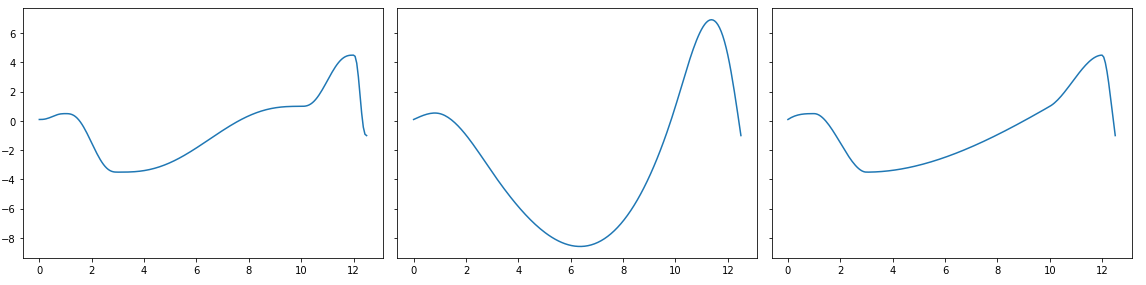
>>> a = core.Smoother([0, 1, 3, 10, 12, 12.5], [0.1, 0.5, -3.5,  1, 4.5, -1])
>>> b = core.Spline(*a.points())
>>> c = pchip(*a.points())

>>> fig, axes = plt.subplots(1, 3, figsize=(16, 4), sharey=True, tight_layout=True)
>>> a.plot(axes=axes[0], show=False)
>>> b.plot(axes=axes[1], show=False)
>>> c.plot()
Args
- args: either a flat list of coordinates in the form
x0, y0, x1, y1, ..., a list of tuples(x0, y0), (x1, y1), ..., a dict{x0:y0, x1:y1, ...}or two arraysxsandys
slope
def slope(slope: float, offset: float = 0.0, bounds: tuple[float, float] = None
          ) -> core.Slope
Generate a straight line with the given slope and offset
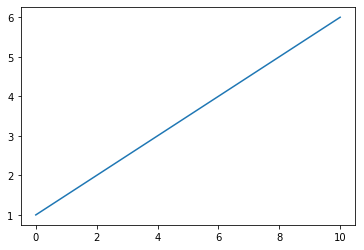
This is the same as linear(0, offset, 1, slope)
Example
>>> a = slope(0.5, 1)
>>> a
Slope[-inf:inf]
>>> a[0:10].plot()
Args
- slope (
float): - offset (
float): (default:0.0) - bounds (
tuple[float, float]): (default:None)
smooth
def smooth(args, numiter: int = 1) -> core.Smooth
A bpf with smoothstep interpolation.
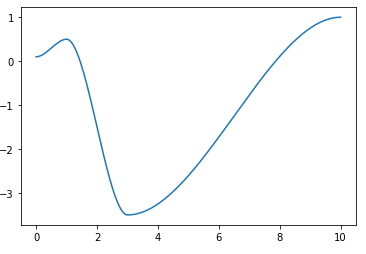
from bpf4.api import *
a = smooth((0, 0.1), (1, 0.5), (3, -3.5), (10, 1))
a.plot()
See Also
Args
- args: either a flat list of coordinates in the form
x0, y0, x1, y1, ..., a list of tuples(x0, y0), (x1, y1), ..., a dict{x0:y0, x1:y1, ...}or two arraysxsandys - numiter (
int): determines the number of smoothstep steps applied (see https://en.wikipedia.org/wiki/Smoothstep) (default:1)
Returns
(core.Smooth) A bpf with smoothstep interpolation
smoother
def smoother(args) -> core.Smoother
A bpf with smootherstep interpolation
This bpf uses Perlin's variation on smoothstep, see https://en.wikipedia.org/wiki/Smoothstep)
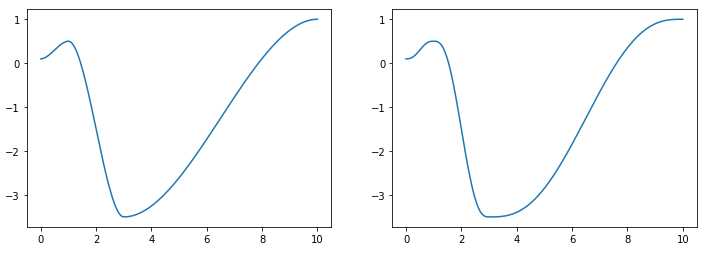
from bpf4 import *
a = smooth(0, 0.1,
           1, 0.5,
           3, -3.5,
           10, 1)
b = smoother(*a.points())
fig, axes = plt.subplots(1, 2, figsize=(12, 4))
a.plot(axes=axes[0], show=False)
b.plot(axes=axes[1])
Args
- args: either a flat list of coordinates in the form
x0, y0, x1, y1, ..., a list of tuples(x0, y0), (x1, y1), ..., a dict{x0:y0, x1:y1, ...}or two arraysxsandys
Returns
(core.Smoother) A bpf with smootherstep interpolation
spline
def spline(args) -> core.Spline
Construct a cubic-spline bpf
A bpf can be constructed in multiple ways:
spline(x0, y0, x1, y1, ...)
spline((x0, y0), (x1, y1), ...)
spline({x0:y0, x1:y1, ...})
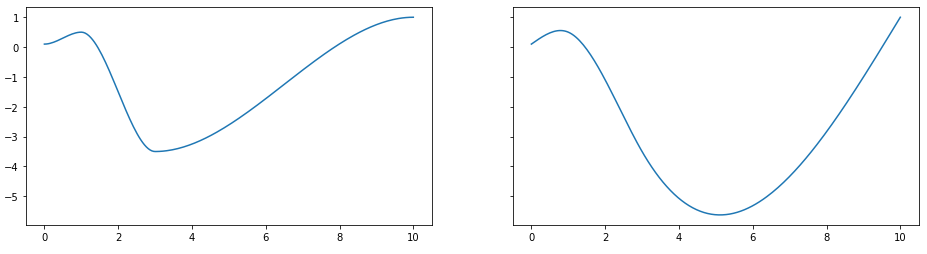
from bpf4 import *
a = smooth(0, 0.1, 1, 0.5, 3, -3.5, 10, 1)
b = spline(*a.points())
fig, axes = plt.subplots(1, 2, figsize=(12, 4))
a.plot(axes=axes[0], show=False)
b.plot(axes=axes[1])
Args
- args: either a flat list of coordinates in the form
x0, y0, x1, y1, ..., a list of tuples(x0, y0), (x1, y1), ..., a dict{x0:y0, x1:y1, ...}or two arraysxsandys
Returns
(core.Spline) A Spline bpf
stack
def stack(bpfs) -> core.Stack
A bpf representing a stack of bpf
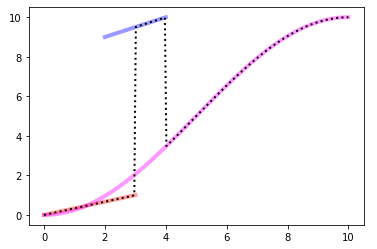
Within a Stack, a bpf does not have outbound values. When evaluated outside its bounds the bpf below is used, iteratively until the lowest bpf is reached. Only the lowest bpf is evaluated outside its bounds
Example
# Interval    bpf
# [0, 3]      a
# (3, 4]      b
# (4, 10]     c

from bpf4 import *
import matplotlib.pyplot as plt
a = linear(0, 0, 3, 1)
b = linear(2, 9, 4, 10)
c = halfcos(0, 0, 10, 10)
s = core.Stack((a, b, c))

ax = plt.subplot(111)
a.plot(color="#f00", alpha=0.4, axes=ax, linewidth=4, show=False)
b.plot(color="#00f", alpha=0.4, axes=ax, linewidth=4, show=False)
c.plot(color="#f0f", alpha=0.4, axes=ax, linewidth=4, show=False)
s.plot(axes=ax, linewidth=2, color="#000", linestyle='dotted')
Args
- bpfs: a sequence of bpfs
Returns
(core.Stack) A stacked bpf
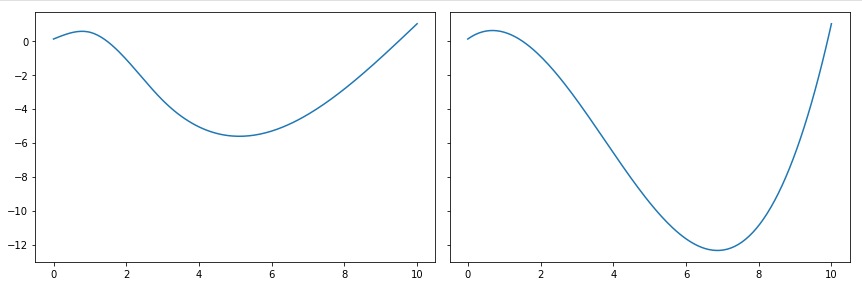
uspline
def uspline(args) -> core.USpline
Construct a univariate cubic-spline bpf
A bpf can be constructed in multiple ways:
uspline(x0, y0, x1, y1, ...)
uspline((x0, y0), (x1, y1), ...)
uspline({x0:y0, x1:y1, ...})
from bpf4 import *
a = spline(0, 0.1, 1, 0.5, 3, -3.5, 10, 1)
b = uspline(*a.points())

fig, axes = plt.subplots(1, 2, figsize=(12, 4), sharey=True, tight_layout=True)
a.plot(axes=axes[0], show=False)
b.plot(axes=axes[1])
Args
- args: either a flat list of coordinates in the form
x0, y0, x1, y1, ..., a list of tuples(x0, y0), (x1, y1), ..., a dict{x0:y0, x1:y1, ...}or two arraysxsandys
Returns
(core.USpline) A USpline bpf