core
| Class | Description |
|---|---|
| BpfBase | BpfBase(xs, ys) |
| BpfInterface | Base class for all Break-Point Functions |
| BpfInversionError | |
| BpfPointsError | |
| Const | Const(double value, tuple bounds: tuple[float, float] = None) |
| Expon | Expon(xs, ys, double exp, int numiter=1) |
| Exponm | Exponm(xs, ys, double exp, int numiter=1) |
| Halfcos | Halfcos(xs, ys, double exp=1.0, int numiter=1) |
| HalfcosExp | Halfcos(xs, ys, double exp=1.0, int numiter=1) |
| Halfcosm | Halfcosm(xs, ys, double exp=1.0, int numiter=1) |
| Linear | Linear(xs, ys) |
| Max | Max(*bpfs) |
| Min | Min(*bpfs) |
| Multi | Multi(xs, ys, interpolations) |
| NanMask | NanMask(BpfInterface a, double masked=0.) |
| Nearest | Nearest(xs, ys) |
| NoInterpol | NoInterpol(xs, ys) |
| Sampled | Sampled(samples, double dx, double x0=0, unicode interpolation=u'linear') |
| Slope | Slope(double slope, double offset=0, tuple bounds=None) |
| Smooth | Smooth(xs, ys, int numiter=1) |
| Smoother | Smoother(xs, ys) |
| Spline | Spline(xs, ys) |
| Stack | Stack(bpfs) |
| USpline | USpline(xs, ys) |
| Function | Description |
|---|---|
blend |
Blend these BPFs |
bpf_zero_crossings |
Return the zeros if b in the interval defined |
brentq |
Calculate the zero of bpf + x0 in the interval (xa, xb) using brentq algorithm |
setA4 |
Set the reference freq used |
BpfInterface
def () -> None
Base class for all Break-Point Functions
Note
BpfInterace is an abstract class. It is not possible to create an instance of it.
Summary
| Property | Description |
|---|---|
| x0 | BpfInterface.x0: float |
| The lower bound of the x coordinate | |
| x1 | BpfInterface.x1: float |
| The upper bound of the x coordinate |
| Method | Description |
|---|---|
| abs | Returns a bpf representing the absolute value of this bpf |
| acos | Returns a bpf representing the arc cosine of this bpf |
| amp2db | Returns a bpf converting linear amplitudes to decibels |
| apply | Create a bpf where func is applied to the result of this pdf |
| asin | Returns a bpf representing the arc sine of this bpf |
| bounds | Returns a tuple (xstart, xend) representing the bounds of this bpf |
| ceil | Returns a bpf representing the ceil of this bpf |
| clip | Return a bpf clipping the result between y0 and y1 |
| concat | Concatenate this bpf to other |
| copy | Create a copy of this bpf |
| cos | Returns a bpf representing the cosine of this bpf |
| crop | Crop this bpf at the given x values (x0, x1) |
| db2amp | Returns a bpf converting decibels to linear amplitudes |
| derivative | Create a curve which represents the derivative of this curve |
| dxton | Split the bounds of this bpf according to a given sampling period dx |
| expon | Returns a bpf representing the exp operation with this bpf |
| f2m | Returns a bpf converting frequencies to midinotes |
| fit_between | Returns a view of this bpf fitted within the interval x0:x1 |
| floor | Returns a bpf representing the floor of this bpf |
| fromseq | BpfInterface.fromseq(cls, points, *kws) |
| integrate | Return the result of the integration of this bpf. |
| integrate_between | Integrate this bpf between x0 and x1 |
| integrated | Return a bpf representing the integration of this bpf at a given point |
| inverted | Return a view on this bpf with the coords inverted |
| keep_slope | A view of this bpf where the slope is continued outside its bounds |
| log | Returns a bpf representing the log of this bpf |
| log10 | Returns a bpf representing the log10 of this bpf |
| m2f | Returns a bpf converting from midinotes to frequency |
| map | The same as map(self, xs) but faster |
| mapn_between | Calculate an array of n values representing this bpf between x0 and x1 |
| max | Returns a bpf representing max(self, b) |
| mean | Calculate the mean value of this bpf. |
| min | Returns a bpf representing min(self, b) |
| nanmask | A nan mask from this bpf |
| ntodx | Calculate the sampling period dx |
| outbound | Return a new Bpf with the given values outside the bounds |
| periodic | Create a new bpf which replicates this in a periodic way |
| plot | Plot the bpf using matplotlib.pyplot. Any key is passed to plot.plot_coords |
| preapply | Create a bpf where func is applied to the argument before it is passed |
| rand | A bpf representing rand(self(x)) |
| render | Create a new bpf representing this bpf rendered at the given points |
| round | A bpf representing round(self(x)) |
| sample_between | Sample this bpf at an interval of dx between x0 and x1 |
| sampled | Sample this bpf at a regular interval, returns a Sampled bpf |
| sampled_between | Sample a portion of this bpf, returns a Sampled bpf |
| shifted | Returns a view of this bpf shifted by dx over the x-axes |
| sin | Returns a bpf representing the sine of this bpf |
| sinh | Returns a bpf representing the sinh of this bpf |
| sqrt | Returns a bpf representing the sqrt of this bpf |
| stretched | Returns a view of this bpf stretched over the x axis. |
| tan | Returns a bpf representing the tan of this bpf |
| tanh | Returns a bpf representing the tanh of this bpf |
| zeros | Find the zeros of this bpf |
Attributes
- x0: BpfInterface.x0: float The lower bound of the x coordinate
- x1: BpfInterface.x1: float The upper bound of the x coordinate
Methods
abs
BpfInterface.abs(self) -> _BpfUnaryFunc
Returns a bpf representing the absolute value of this bpf
acos
BpfInterface.acos(self) -> _BpfUnaryFunc
Returns a bpf representing the arc cosine of this bpf
amp2db
BpfInterface.amp2db(self) -> _Bpf_amp2db
Returns a bpf converting linear amplitudes to decibels
Example
>>> linear(0, 0, 1, 1).amp2db().map(10)
array([-280.        ,  -19.08485019,  -13.06425028,   -9.54242509,
       -7.04365036,   -5.1054501 ,   -3.52182518,   -2.18288939,
       -1.02305045,    0.        ])
Returns
(BpfInterface) A bpf representing \x -> amp2db(self(x))
apply
BpfInterface.apply(self, func)
Create a bpf where func is applied to the result of this pdf
NB: a.apply(b) is the same as a | b
Example
>>> from bpf4 import *
>>> from math import *
>>> a = linear(0, 0, 1, 10)
>>> def func(x):
...     return sin(x) + 1
>>> b = a.apply(func)
>>> b(1)
0.4559788891106302
>>> sin(a(1)) + 1
0.4559788891106302
Args
- func (
callable): a function to apply to the result of this bpf
Returns
(BpfInterface) A bpf representing func(self(x))
asin
BpfInterface.asin(self) -> _BpfUnaryFunc
Returns a bpf representing the arc sine of this bpf
bounds
BpfInterface.bounds(self)
Returns a tuple (xstart, xend) representing the bounds of this bpf
The returned bounds indicate the range within which this bpf is defined, but any bpf can be evaluated outside those bounds. In such a case the out-of-bound result will depend on the concrete subclass being evaluated. For most cases the out-of-bound result is the same as the result at the bounds
Example
>>> from bpf4 import *
>>> a = linear(1, 10, 2, 25)
>>> a.bounds()
(1.0, 2.0)
Returns
(tuple[float, float]) The bounbs of this bpf
ceil
BpfInterface.ceil(self) -> _BpfUnaryFunc
Returns a bpf representing the ceil of this bpf
clip
BpfInterface.clip(self, double y0=-inf, double y1=inf) -> _BpfLambdaClip
Return a bpf clipping the result between y0 and y1
>>> a = linear(0, -1, 1, 1).clip(0, 1)
>>> a.map(20)
array([0.        , 0.        , 0.        , 0.        , 0.        ,
       0.        , 0.        , 0.        , 0.        , 0.        ,
       0.05263158, 0.15789474, 0.26315789, 0.36842105, 0.47368421,
       0.57894737, 0.68421053, 0.78947368, 0.89473684, 1.        ])
>>> a.plot()
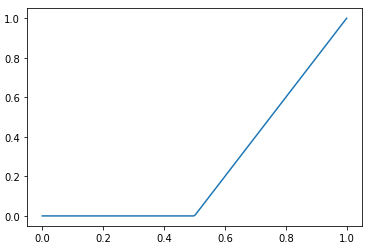
Args
- y0 (
float): the min. y value (default:-inf) - y1 (
float): the max. y value (default:inf)
Returns
(BpfInterface) A view of this bpf clipped to the given y values
concat
BpfInterface.concat(self, BpfInterface other) -> BpfInterface
Concatenate this bpf to other
other is shifted to start at the end of self
Example
>>> a = linear(0, 0, 1, 10)
>>> b = linear(3, 100, 10, 200)
>>> c = a.concat(b)
>>> c
_BpfConcat2[0.0:8.0]
>>> c(1 - 1e-12), c(1)
(9.99999999999, 100.0)
>>> c.plot()
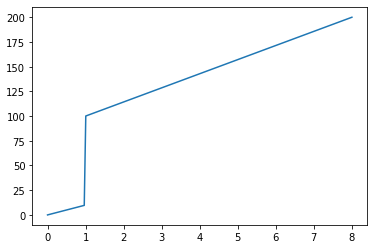
Args
- other:
copy
BpfInterface.copy(self)
Create a copy of this bpf
Returns
(BpfInterface) A copy of this bpf
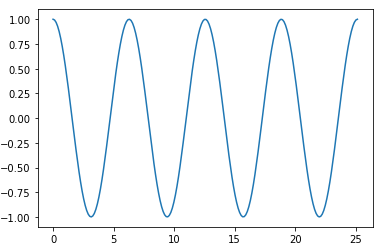
cos
BpfInterface.cos(self) -> _BpfUnaryFunc
Returns a bpf representing the cosine of this bpf
from bpf4 import *
from math import pi
a = slope(1).cos()
a[0:8*pi].plot()
crop
BpfInterface.crop(self, double x0, double x1, y0=None, y1=None)
Crop this bpf at the given x values (x0, x1)
Note
This is the same as taking a slice bpf[lowerbound:upperbound]
but this method allows to explicitely set the outbound values.
These two statements are the same: bpf[x0:x1].outbound(y0, y1)
and bpf.slice(x0, x1, y0, y1)
Args
- x0 (
float): the lower bound to cut this bpf at - x1 (
float): the upper bound to cut this bpf - y0 (
float): if given, the value returned for x < x0 (default:None) - y1 (
float): if given, the value returned for x > x1 (default:None)
Returns
(_BpfCrop) this bpf cropped to the interval x0:x1. If y0 and/our y1 are given, then these values are returned for any x outside the given bounds, otherwise the value returned by this bpf at x0 is extended for any x < x0 and the same for the upper bound
db2amp
BpfInterface.db2amp(self) -> _Bpf_db2amp
Returns a bpf converting decibels to linear amplitudes
Example
>>> linear(0, 0, 1, -60).db2amp().map(10)
array([1.        , 0.46415888, 0.21544347, 0.1       , 0.04641589,
       0.02154435, 0.01      , 0.00464159, 0.00215443, 0.001     ])
Returns
(BpfInterface) A bpf representing \x -> db2amp(self(x))
derivative
BpfInterface.derivative(self) -> BpfInterface
Create a curve which represents the derivative of this curve
It implements Newtons difference quotiont, so that:
                bpf(x + h) - bpf(x)
derivative(x) = -------------------
                          h
Example
>>> from bpf4 import *
>>> a = slope(1)[0:6.28].sin()
>>> a.plot(show=False, color="red")
>>> b = a.derivative()
>>> b.plot(color="blue")
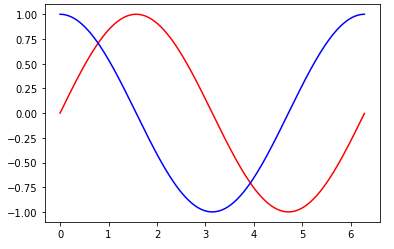
Returns
(BpfInterface) A bpf which returns the derivative of this bpf at any given x coord
dxton
BpfInterface.dxton(self, double dx) -> int
Split the bounds of this bpf according to a given sampling period dx
Calculate the number of points in as a result of dividing the
bounds of this bpf by the sampling period dx:
n = (x1 + dx - x0) / dx
where x0 and x1 are the x coord start and end points and dx is the sampling period.
>>> from bpf4 import *
>>> a = linear(0, 0, 1,  10, 2, 5)
# Sample a with a period of 0.1
>>> ys = a.map(a.dxton(0.1))
>>> len(ys)
21
>>> ys
array([ 0.,  1.,  2.,  3.,  4.,  5.,  6.,  7.,  8.,  9., 10.,  9.,  8.,
7.,  6.,  5.,  4.,  3.,  2.,  1.,  0.])
See Also
Args
- dx (
float): the sampling period
Returns
(int) The number of points to sample
expon
BpfInterface.expon(self) -> _BpfUnaryFunc
Returns a bpf representing the exp operation with this bpf
Example
>>> from bpf4 import *
>>> a = linear(0, 0, 1, 10)
>>> a(0.1)
1.0
>>> exp(1.0)
2.718281828459045
>>> a.expon()(0.1)
2.718281828459045
f2m
BpfInterface.f2m(self, double a4=0.)
Returns a bpf converting frequencies to midinotes
Example
>>> from bpf4 import *
>>> freqs = linear(0, 442, 1, 882)
>>> freqs.f2m().map(10)
array([69.        , 70.82403712, 72.47407941, 73.98044999, 75.3661766 ,
       76.64915905, 77.84358713, 78.96089998, 80.01045408, 81.        ])
Args
- a4 (
float): frequency value for A4. If not given, uses the global value (see setA4) (default:0.0)
Returns
(BpfInterface) A bpf representing \x -> f2m(self(x))
fit_between
BpfInterface.fit_between(self, double x0, double x1) -> BpfInterface
Returns a view of this bpf fitted within the interval x0:x1
This operation only makes sense if the bpf is bounded
(none of its bounds is inf)
Example
>>> from bpf4 import *
>>> a = linear(1, 1, 2, 5)
>>> a.bounds()
(1, 5)
>>> b = a.fit_between(0, 10)
>>> b.bounds()
0, 10
>>> b(10)
5
Args
- x0: the lower bound to fit this bpf
- x1: the upper bound to fit this bpf
Returns
(BpfInterface) The projected bpf
floor
BpfInterface.floor(self) -> _BpfUnaryFunc
Returns a bpf representing the floor of this bpf
fromseq
def fromseq(points: ndarray | list[float], kws) -> BpfBase
BpfInterface.fromseq(cls, points, *kws)
A helper constructor with points given as tuples or as a flat sequence.
Example
These operations result in the same bpf:
Linear.fromseq(x0, y0, x1, y1, x2, y2, ...)
Linear.fromseq((x0, y0), (x1, y1), (x2, y2), ...)
Linear((x0, x1, ...), (y0, y1, ...))
Args
- points (
ndarray | list[float]): either the interleaved x and y points, or each point as a 2D tuple**kws(dict): any keyword will be passed to the default constructor (for example,expin the case of anExponbpf) - kws:
Returns
(BpfBase) The constructed bpf
integrate
BpfInterface.integrate(self) -> double
Return the result of the integration of this bpf.
If any of the bounds is inf, the result is also inf.
Note
To set the bounds of the integration, first crop the bpf by slicing it: bpf[start:end]
Example
>>> linear(0, 0, 10, 10).sin()[0:2*pi].integrate()
-1.7099295055304798e-17
Returns
(float) The result of the integration
integrate_between
BpfInterface.integrate_between(self, double x0, double x1, size_t N=0) -> double
Integrate this bpf between x0 and x1
Args
- x0: start x of the integration range
- x1: end x of the integration range
- N (
int): number of intervals to use for integration (default:0)
Returns
(float) The result of the integration
integrated
BpfInterface.integrated(self) -> BpfInterface
Return a bpf representing the integration of this bpf at a given point
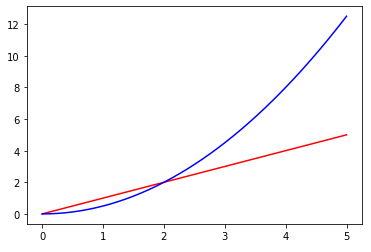
Example
a = linear(0, 0, 5, 5)
b = a.integrated()
a.plot(show=False, color="red")
b.plot(color="blue")
See Also
Returns
(BpfInterface) A bpf representing the integration of this bpf
inverted
BpfInterface.inverted(self)
Return a view on this bpf with the coords inverted
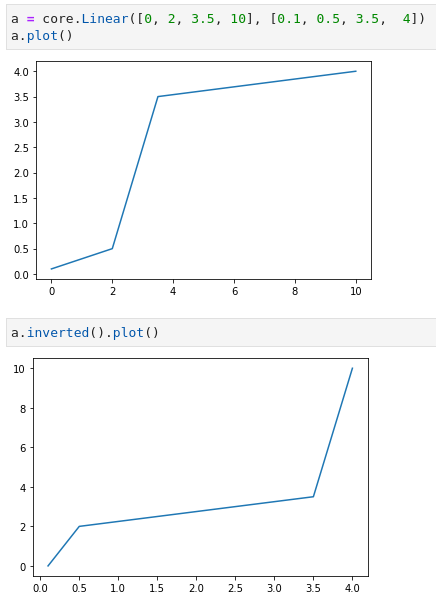
In an inverted function the coordinates are swaped: the inverted version of a bpf indicates which x corresponds to a given y
Returns None if the function is not invertible. For a function to be invertible, it must be strictly increasing or decreasing, with no local maxima or minima.
f.inverted()(f(x)) = x
So if y(1) == 2, then y.inverted()(2) == 1
Returns
(BpfInterface) a view on this bpf with the coords inverted
keep_slope
BpfInterface.keep_slope(self, double epsilon=0.0001)
A view of this bpf where the slope is continued outside its bounds
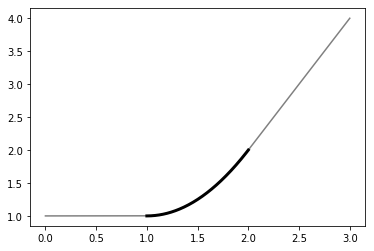
Return a new bpf which is a copy of this bpf when inside bounds() but outside bounds() it behaves as a linear bpf with a slope equal to the slope of this bpf at its extremes
Example
a = expon(1, 1, 2, 2, exp=2)
b = a.keep_slope()
b[0:3].plot(show=False, color="grey")
a.plot(color="black", linewidth=3)
Args
- epsilon (
float): an epsilon value to use when deriving the this bpf to calculate its slope (default:0.0001)
Returns
(BpfInterface) A view of this bpf which keeps its slope outside its bounds (instead of just returning the last defined value)
log
BpfInterface.log(self, double base=M_E) -> _BpfLambdaLog
Returns a bpf representing the log of this bpf
Args
- base (
float): the base of the log (default:2.718281828459045)
Returns
(BpfInterface) A bpf representing \x -> log(self(x), base)
log10
BpfInterface.log10(self) -> _BpfUnaryFunc
Returns a bpf representing the log10 of this bpf
m2f
BpfInterface.m2f(self, double a4=0.)
Returns a bpf converting from midinotes to frequency
Example
>>> from bpf4 import *
>>> midinotes = linear(0, 60, 1, 65)
>>> freqs = midinotes.m2f()
>>> freqs.map(10)
array([262.81477242, 271.38531671, 280.23535149, 289.37399111,
       298.81064715, 308.55503809, 318.61719934, 329.0074936 ,
       339.73662146, 350.81563248])
Args
- a4 (
float): frequency value for A4. If not given, uses the global value (see setA4) (default:0.0)
Returns
(BpfInterface) A bpf representing \x -> m2f(self(x))
map
BpfInterface.map(self, xs, ndarray out=None) -> ndarray
The same as map(self, xs) but faster
bpf.map(10) == bpf.map(numpy.linspace(x0, x1, 10))
Example
>>> out = numpy.empty((100,), dtype=float)
>>> xs = numpy.linspace(0, 10, 100)
# This is the right way to pass an output array
>>> out = thisbpf.map(xs, out)
Args
- xs (
ndarray | int): the x coordinates at which to sample this bpf, or an integer representing the number of elements to calculate in an evenly spaced grid between the bounds of this bpf - out (
ndarray): if given, an attempt will be done to use it as destination for the result. The user should not trust that this actually happens (see example) (default:None)
mapn_between
BpfInterface.mapn_between(self, int n, double x0, double x1, ndarray out=None) -> ndarray
Calculate an array of n values representing this bpf between x0 and x1
x0 and x1 are included
Example
out = numpy.empty((100,), dtype=float)
out = thisbpf.mapn_between(100, 0, 10, out)
Args
- n:
- x0 (
float): lower bound to map this bpf - x1 (
float): upper bound to map this bpf - out (
ndarray): if included, results are placed here. (default:None)
Returns
(ndarray) An array of n elements representing this bpf at the given values within the range x0:x1. This is out if it was passed
max
BpfInterface.max(self, b)
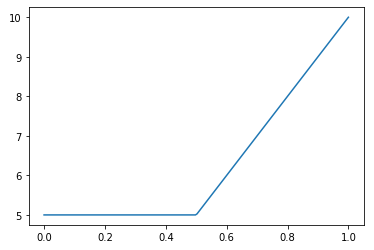
Returns a bpf representing max(self, b)
Example
>>> from bpf4 import *
>>> a = linear(0, 0, 1, 10)
>>> b = a.max(4)
>>> b(0), b(0.5), b(1)
(4.0, 5.0, 10.0)
>>> b.plot()
Args
- b (
float | BpfInterface): a const float or a bpf
Returns
(Max) A Max bpf representing max(self, b), which can be evaluated at any x coord
mean
BpfInterface.mean(self) -> double
Calculate the mean value of this bpf.
To constrain the calculation to a given portion, use:
bpf.integrate_between(start, end) / (end-start)
Returns
(float) The average value of this bpf along its bounds
min
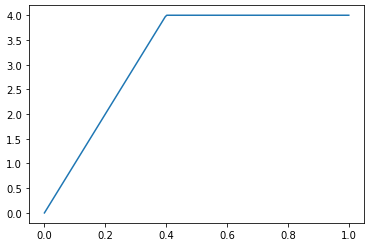
BpfInterface.min(self, b)
Returns a bpf representing min(self, b)
Example
>>> from bpf4 import *
>>> a = linear(0, 0, 1, 10)
>>> b = a.min(4)
>>> b(0), b(0.5), b(1)
(0, 4.0, 5.0)
>>> b.plot()
Args
- b (
float | BpfInterface): a const float or a bpf
Returns
(Min) A Min bpf representing min(self, b), which can be evaluated at any x coord
nanmask
BpfInterface.nanmask(self, double masked=0.) -> NanMask
A nan mask from this bpf
A nan mask returns nan whenever this bpf returns the masked value, otherwise it returns its original value.
Example
Create a mask for a frequency bpf b, to set it to nan whenever
the frequency is lower than 50 Hz
>>> b = bpf.linear(0, 440, 1, 440, 2, 100, 3, 40, 5, 80, 6, 440)
>>> bmasked = b * (b >= 50).nanmask()
>>> bmasked.plot()
>>> bpf4.util.split_fragments(bmasked)
Args
- masked (
float): the value to convert to NAN (default:0.0)
ntodx
BpfInterface.ntodx(self, int N) -> double
Calculate the sampling period dx
Calculate sampling period dx so that the bounds of
this bpf are divided into N parts: dx = (x1-x0) / (N-1).
The period is calculated so that lower and upper bounds are
included, following numpy's linspace
!!! info "See Also"
[dxton()](#dxton)
Example
```python
a = linear(0, 0, 1, 1) dx = a.ntodx(10) dx 0.11111111 np.arange(a.x0, a.x1, dx) array([0. , 0.11111111, 0.22222222, 0.33333333, 0.44444444, 0.55555556, 0.66666667, 0.77777778, 0.88888889, 1. ])
Args
- N (
int): The number of points to sample within the bounds of this bpf
Returns
(float) The sampling period dx
outbound
BpfInterface.outbound(self, double y0, y1=None)
Return a new Bpf with the given values outside the bounds
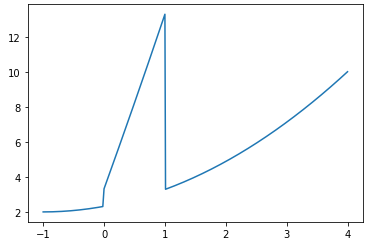
Used like bpf.outbound(0, 0) + fallbackbpf it can be used
to give a fallback bpf for values outside this bpf (see example)
Examples
>>> from bpf4 import *
>>> a = linear(0, 1, 1, 10).outbound(-1, 0)
>>> a(-0.5)
-1
>>> a(1.1)
0
>>> a(0)
1
>>> a(1)
10

# fallback to another curve outside self
>>> a = linear(0, 1, 1, 10).outbound(0, 0) + expon(-1, 2, 4, 10, exp=2)
>>> a.plot()
Args
- y0 (
float): returned for x values lower than the lower bound - y1 (
float): returned for x values higher than the upper bound. If not given, the same value fory0is used (default:None)
Returns
(BpfInterface) a bpf where inside the bounds it returns the values of this bpf and outside the bounds the values given here
periodic
BpfInterface.periodic(self)
Create a new bpf which replicates this in a periodic way
The new bpf is a copy of this bpf when inside its bounds and outside it, it replicates it in a periodic way, with no bounds.
Example
>>> from bpf4 import *
>>> a = core.Linear((0, 1), (-1, 1)).periodic()
>>> a
_BpfPeriodic[-inf:inf]
>>> a.plot()

Returns
(BpfInterface) A periodic view of this bpf
plot
BpfInterface.plot(self, kind=u'line', int n=-1, show=True, axes=None, **keys)
Plot the bpf using matplotlib.pyplot. Any key is passed to plot.plot_coords
Example
from bpf4 import *
a = linear(0, 0, 1, 10, 2, 0.5)
a.plot()

# Plot to a preexistent axes
ax = plt.subplot()
a.plot(axes=ax)
Args
- kind (
str): one of 'line', 'bar' (default:line) - n (
int): the number of points to plot (default:-1) - show (
bool): if the plot should be shown immediately after (default is True). If you want to display multiple BPFs sharing an axes you can call plot on each of the bpfs with show=False, and then either call the last one with plot=True or call bpf4.plot.show(). (default:True) - axes (
matplotlib.pyplot.Axes): if given, will be used to plot onto it, otherwise an ad-hoc axes is created (default:None) - keys:
Returns
the pyplot.Axes object. This will be the axes passed as argument, if given, or a new axes created for this plot
preapply
BpfInterface.preapply(self, func)
Create a bpf where func is applied to the argument before it is passed
This is equivalent to func(x) | self
Example
>>> bpf = Linear((0, 1, 2), (0, 10, 20))
>>> bpf(0.5)
5

>>> shifted_bpf = bpf.preapply(lambda x: x + 1)
>>> shifted_bpf(0.5)
15
NB: bpf1.preapply(bpf2) is the same as bpf2 | bpf1
Args
- func (
callable): a functionfunc(x: float) -> floatwhich is applied to the argument before passing it to this bpf
Returns
(BpfInterface) A bpf following the pattern lambda x: bpf(func(x))
rand
BpfInterface.rand(self) -> _BpfRand
A bpf representing rand(self(x))
Returns
(BpfInterface) A bpf representing the operation `rand(self(x))
render
BpfInterface.render(self, xs, interpolation=u'linear')
Create a new bpf representing this bpf rendered at the given points
The difference between .render and .sampled is that this method
creates a Linear/NoInterpol bpf whereas .sampled returns a
Sampled bpf (a Sampled bpf works only for regularly sampled data,
a Linear or NoInterpol bpfs accept any data as its x coordinate)
Example
>>> from bpf4 import *
>>> from math import *
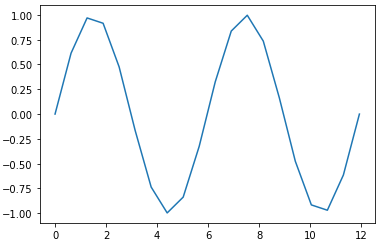
>>> a = slope(1)[0:4*pi].sin()
>>> b = a.render(20)   # Sample this bpf at 20 points within its bounds
>>> b
Sampled[0.0:12.566370614359172]
>>> b.plot()
See Also
Args
- xs (
int | list | np.ndarray): a seq of points at which this bpf is sampled or a number, in which case an even grid is calculated with that number of points. In the first case a Linear or NoInterpol bpf is returned depending on theinterpolationparameter (see below). In the second case aSampledbpf is returned. - interpolation (
str): the interpoltation type of the returned bpf. One of 'linear', 'nointerpol' (default:linear)
Returns
(BpfInterface) a new bpf representing this bpf. Depending on the interpolation this new bpf will be a Sampled, a Linear or a NoInterpol bpf
round
BpfInterface.round(self) -> _BpfLambdaRound
A bpf representing round(self(x))
Returns
(BpfInterface) A bpf representing the operation round(self(x))
sample_between
BpfInterface.sample_between(self, double x0, double x1, double dx, ndarray out=None) -> ndarray
Sample this bpf at an interval of dx between x0 and x1
Note
The interface is similar to numpy's linspace
Example
>>> a = linear(0, 0, 10, 10)
>>> a.sample_between(0, 10, 1)
[0 1 2 3 4 5 6 7 8 9 10]
This is the same as a.mapn_between(11, 0, 10)
Args
- x0 (
float): point to start sampling (included) - x1 (
float): point to stop sampling (included) - dx (
float): the sampling period - out (
ndarray): if given, the result will be placed here and no new array will be allocated (default:None)
Returns
(ndarray) An array with the values of this bpf sampled at at a regular grid of period dx from x0 to x1. If out is given the result is placed in it
sampled
BpfInterface.sampled(self, double dx, interpolation=u'linear') -> BpfInterface
Sample this bpf at a regular interval, returns a Sampled bpf
Sample this bpf at an interval of dx (samplerate = 1 / dx) returns a Sampled bpf with the given interpolation between the samples
Note
If you need to sample a portion of the bpf, use sampled_between
The same results can be achieved via indexing, in which case the resulting bpf will be linearly interpolated:
bpf[::0.1]    # returns a sampled version of this bpf with a dx of 0.1
bpf[:10:0.1]  # samples this bpf between (x0, 10) at a dx of 0.1
Args
- dx (
float): the sample interval - interpolation (
str): the interpolation kind. One of 'linear', 'nointerpol', 'halfcos', 'expon(XX)', 'halfcos(XX)' (where XX is an exponential passed to the interpolation function) (default:linear)
Returns
(Sampled) The sampled bpf
sampled_between
BpfInterface.sampled_between(self, double x0, double x1, double dx, interpolation=u'linear') -> BpfInterface
Sample a portion of this bpf, returns a Sampled bpf
NB: This is the same as thisbpf[x0:x1:dx]
Args
- x0 (
float): point to start sampling (included) - x1 (
float): point to stop sampling (included) - dx (
float): the sampling period - interpolation (
str): the interpolation kind. One of 'linear', 'nointerpol', 'halfcos', 'expon(XX)', 'halfcos(XX)' (where XX is an exponential passed to the interpolation function). For (default:linear)
Returns
(Sampled) The Sampled bpf, representing this bpf sampled at a grid of [x0:x1:dx] with the given interpolation
shifted
BpfInterface.shifted(self, dx) -> BpfInterface
Returns a view of this bpf shifted by dx over the x-axes
This is the same as .shift, but a new bpf is returned
Example
>>> from bpf4 import *
>>> a = linear(0, 1, 1, 5)
>>> b = a.shifted(2)
>>> b(3) == a(1)
Args
- dx:
sin
BpfInterface.sin(self) -> _BpfUnaryFunc
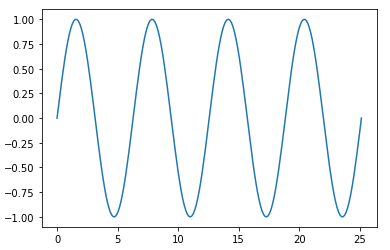
Returns a bpf representing the sine of this bpf
from bpf4 import *
from math import pi
a = slope(1).sin()
a[0:8*pi].plot()
sinh
BpfInterface.sinh(self) -> _BpfUnaryFunc
Returns a bpf representing the sinh of this bpf
sqrt
BpfInterface.sqrt(self) -> _BpfUnaryFunc
Returns a bpf representing the sqrt of this bpf
stretched
BpfInterface.stretched(self, double rx, double fixpoint=0.)
Returns a view of this bpf stretched over the x axis.
NB: to stretch over the y-axis, just multiply this bpf
See Also
Example
Stretch the shape of the bpf, but preserve the start position
>>> a = linear(1, 1, 2, 2)
>>> b = a.stretched(4, fixpoint=a.x0)
>>> b.bounds()
(1, 9)
>>> a.plot(show=False); b.plot()
Args
- rx (
float): the stretch factor - fixpoint (
float): the point to use as reference (default:0.0)
Returns
(BpfInterface) A projection of this bpf stretched/compressed by by the given factor
tan
BpfInterface.tan(self) -> _BpfUnaryFunc
Returns a bpf representing the tan of this bpf
tanh
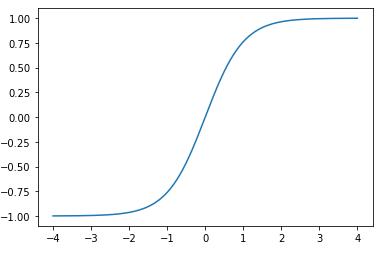
BpfInterface.tanh(self) -> _BpfUnaryFunc
Returns a bpf representing the tanh of this bpf
from bpf4 import *
a = slope(1).tanh()
a[-4:4].plot()
zeros
BpfInterface.zeros(self, double h=0.01, int N=0, double x0=NAN, double x1=NAN, int maxzeros=0) -> list
Find the zeros of this bpf
Example
>>> a = bpf.linear(0, -1, 1, 1)
>>> a.zeros()
[0.5]
Args
- h (
float): the accuracy to scan for zero-crossings. If two zeros are within this distance, they will be resolved as one. (default:0.01) - N (
int): alternatively, you can give the number of intervals to scan. h will be derived from this (default:0) - x0 (
float): the point to start searching. If not given, the starting point of this bpf will be used (default:nan) - x1 (
float): the point to stop searching. If not given, the end point of this bpf is used (default:nan) - maxzeros (
int): if > 0, stop the search when this number of zeros have been found (default:0)
Returns
(List[float]) A list with the zeros of this bpf
BpfBase
- Base Class: BpfInterface
BpfBase(xs, ys)
Summary
| Property | Description |
|---|---|
| descriptor | BpfBase.descriptor: str |
A string describing the interpolation function of this bpf |
| exp | BpfBase.exp: float
The exponential of the interpolation function of this bpf |
| Method | Description |
|---|---|
| init | Base constructor for bpfs |
| clone_with_new_data | Create a new bpf with the same attributes as self but with new data |
| insertpoint | Return a copy of this bpf with the point (x, y) inserted |
| mapn_between | BpfBase.mapn_between(self, int n, double xstart, double xend, ndarray out=None) -> ndarray |
| outbound | Set the values inplace returned when this bpf is evaluated outside its bounds. |
| points | Returns a tuple with the points defining this bpf |
| removepoint | Return a copy of this bpf with point at x removed |
| segments | Return an iterator over the segments of this bpf |
| shift | Shift the bpf along the x-coords, INPLACE |
| split | Split this bpf into fragments separated by nan y values |
| stretch | Stretch or compress this bpf in the x-coordinate INPLACE |
Attributes
- descriptor: BpfBase.descriptor: str A string describing the interpolation function of this bpf
- exp: BpfBase.exp: float The exponential of the interpolation function of this bpf
Methods
__init__
def __init__(xs: list[float] | numpy.ndarray, ys: list[float] | numpy.ndarray
             ) -> None
Base constructor for bpfs
xs and ys should be of the same size
Args
- xs (
list[float] | numpy.ndarray): x data - ys (
list[float] | numpy.ndarray): y data
clone_with_new_data
BpfBase.clone_with_new_data(self, ndarray xs: ndarray, ndarray ys: ndarray) -> BpfInterface
Create a new bpf with the same attributes as self but with new data
Args
- xs (
ndarray): the x-coord data - ys (
ndarray): the y-coord data
Returns
(BpfInterface) The new bpf. It will be of the same class as self
insertpoint
BpfBase.insertpoint(self, double x, double y)
Return a copy of this bpf with the point (x, y) inserted
Note
self is not modified
Args
- x (
float): x coord - y (
float): y coord
Returns
(BpfInterface) A clone of this bpf with the point inserted
mapn_between
def mapn_between(self, n, xstart, xend, out=None) -> None
BpfBase.mapn_between(self, int n, double xstart, double xend, ndarray out=None) -> ndarray
Args
- n:
- xstart:
- xend:
- out: (default:
None)
outbound
BpfBase.outbound(self, double y0, y1=None)
Set the values inplace returned when this bpf is evaluated outside its bounds.
The default behaviour is to interpret the values at the bounds to extend to infinity.
In order to not change this bpf inplace, use b.copy().outbound(y0, y1)
Args
- y0 (
float): the value for the lower bound - y1 (
float | None): the value for the upper bound (y0 if not given) (default:None)
Returns
(BpfInterface) self
points
BpfBase.points(self)
Returns a tuple with the points defining this bpf
Example
>>> b = Linear.fromseq(0, 0, 1, 100, 2, 50)
>>> b.points()
([0, 1, 2], [0, 100, 50])
Returns
(tuple[ndarray, ndarray]) a tuple (xs, ys) where xs is an array holding the values for the x coordinate, and ys holds the values for the y coordinate
removepoint
BpfBase.removepoint(self, double x)
Return a copy of this bpf with point at x removed
Raises ValueError if x is not in this bpf
To remove elements by index, do:
xs, ys = mybpf.points()
xs = numpy.delete(xs, indices)
ys = numpy.delete(ys, indices)
mybpf = mybpf.clone_with_new_data(xs, ys)
Args
- x (
float): the x point to remove
Returns
(BpfInterface) A copy of this bpf with the given point removed
segments
BpfBase.segments(self)
Return an iterator over the segments of this bpf
Each segment is a tuple (x: float, y: float, interpoltype: str, exponent: float)
Exponent is only of value if the interpolation type makes use of it.
Returns
(Iterable[tuple[float, float, str, float]]) An iterator of segments, where each segment has the form (x, y, interpoltype:str, exponent)
shift
BpfBase.shift(self, double dx)
Shift the bpf along the x-coords, INPLACE
Use .shifted to create a new bpf
Args
- dx (
float): the shift interval
split
BpfBase.split(self, double sep=NAN)
Split this bpf into fragments separated by nan y values
Args
- sep (
float): the separator to use (default:nan)
Returns
(list[BpfBase]) A list of fragments
stretch
BpfBase.stretch(self, double rx)
Stretch or compress this bpf in the x-coordinate INPLACE
NB: use stretched to create a new bpf
Args
- rx (
float): the stretch/compression factor
Expon
- Base Class: BpfBase
Expon(xs, ys, double exp, int numiter=1)
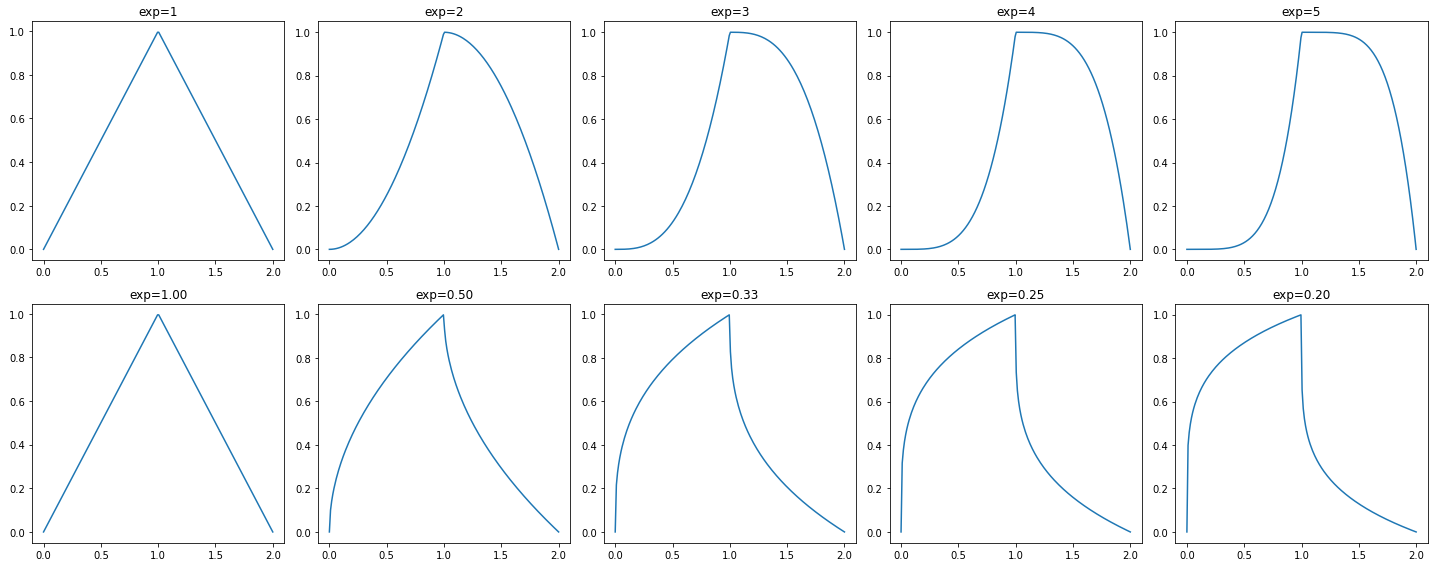
A bpf with exponential interpolation
Example
from bpf4 import *
import matplotlib.pyplot as plt
numplots = 5
fig, axs = plt.subplots(2, numplots, tight_layout=True, figsize=(20, 8))
for i in range(numplots):
    exp = i+1
    core.Expon([0, 1, 2], [0, 1, 0], exp=exp).plot(show=False, axes=axs[0, i])
    core.Expon([0, 1, 2], [0, 1, 0], exp=1/exp).plot(show=False, axes=axs[1, i])
    axs[0, i].set_title(f'{exp=}')
    axs[1, i].set_title(f'exp={1/exp:.2f}')

plot.show()
Summary
| Method | Description |
|---|---|
| init | - |
Methods
__init__
def __init__(xs: ndarray, ys: ndarray, exp: float, numiter: int) -> None
Args
- xs (
ndarray): the x-coord data - ys (
ndarray): the y-coord data - exp (
float): an exponent applied to the halfcosine interpolation - numiter (
int): how many times to apply the interpolation
Exponm
- Base Class: Expon
Exponm(xs, ys, double exp, int numiter=1)
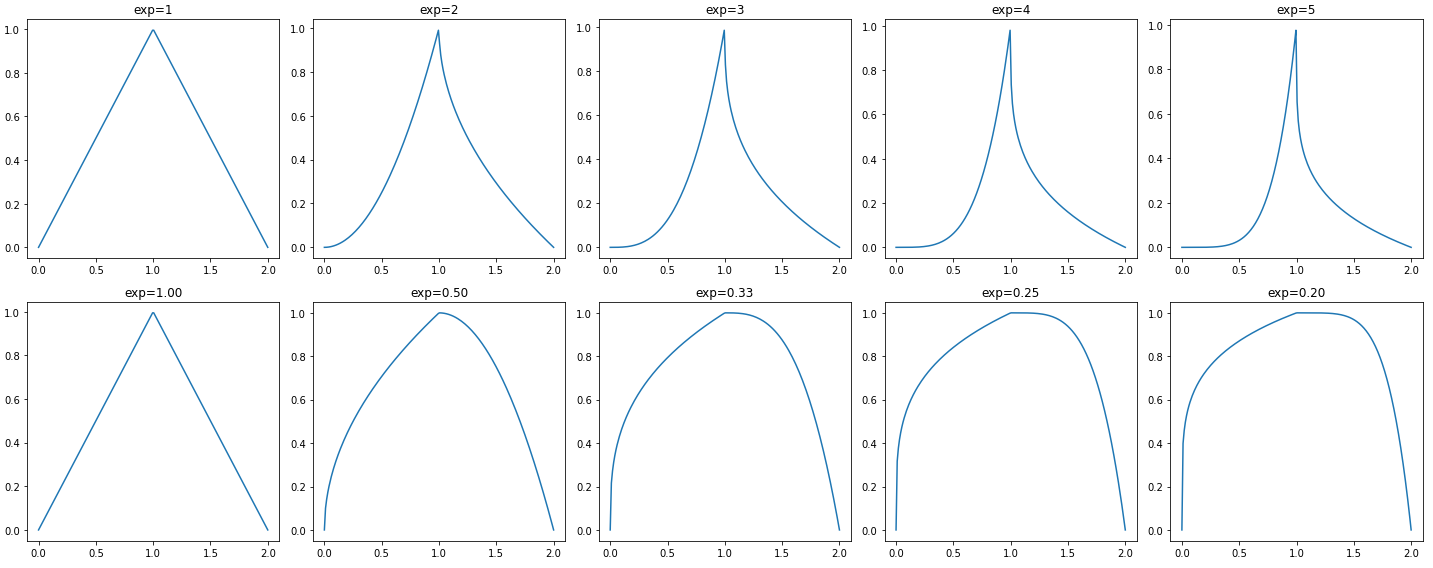
A bpf with symmetrical exponential interpolation
from bpf4 import *
import matplotlib.pyplot as plt
numplots = 5
fig, axs = plt.subplots(2, numplots, tight_layout=True, figsize=(20, 8))
for i in range(numplots):
    exp = i+1
    core.Exponm([0, 1, 2], [0, 1, 0], exp=exp).plot(show=False, axes=axs[0, i])
    core.Exponm([0, 1, 2], [0, 1, 0], exp=1/exp).plot(show=False, axes=axs[1, i])
    axs[0, i].set_title(f'{exp=}')
    axs[1, i].set_title(f'exp={1/exp:.2f}')

plot.show()
Summary
| Method | Description |
|---|---|
| init | - |
Methods
__init__
def __init__(xs: ndarray, ys: ndarray, exp: float, numiter: int) -> None
Args
- xs (
ndarray): the x-coord data - ys (
ndarray): the y-coord data - exp (
float): an exponent applied to the halfcosine interpolation - numiter (
int): how many times to apply the interpolation
Halfcos
- Base Class: BpfBase
Halfcos(xs, ys, double exp=1.0, int numiter=1)
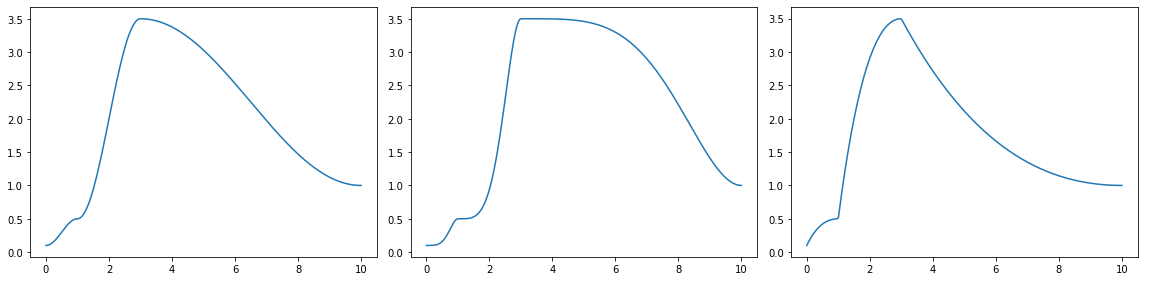
A bpf with half-cosine interpolation
HalfcosExp is the same as Halfcos. It exists with two names for compatibility
a = core.Halfcos([0, 1, 3, 10], [0.1, 0.5, 3.5,  1])
b = core.Halfcos(*a.points(), exp=2)
c = core.Halfcos(*a.points(), exp=0.5)
fig, axes = plt.subplots(1, 3, figsize=(16, 4), tight_layout=True)
a.plot(axes=axes[0], show=False)
b.plot(axes=axes[1], show=False)
c.plot(axes=axes[2])
Summary
| Method | Description |
|---|---|
| init | - |
Methods
__init__
def __init__(xs: ndarray, ys: ndarray, exp: float, numiter: int) -> None
Args
- xs (
ndarray): the x-coord data - ys (
ndarray): the y-coord data - exp (
float): an exponent applied to the halfcosine interpolation - numiter (
int): how many times to apply the interpolation
Halfcosm
- Base Class: Halfcos
Halfcosm(xs, ys, double exp=1.0, int numiter=1)
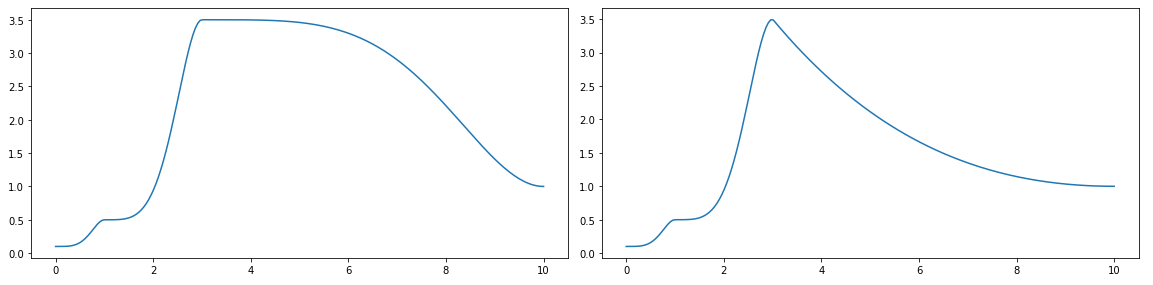
A bpf with half-cosine and exponent depending on the orientation of the interpolation
When interpolating between two y values, y0 and y1, if y1 < y0 the exponent is inverted, resulting in a symmetrical interpolation shape
a = core.Halfcos([0, 1, 3, 10], [0.1, 0.5, 3.5,  1], exp=2)
b = core.Halfcosm(*a.points(), exp=2)
fig, axes = plt.subplots(1, 2, figsize=(16, 4))
a.plot(axes=axes[0], show=False)
b.plot(axes=axes[1])
Linear
- Base Class: BpfBase
Linear(xs, ys)
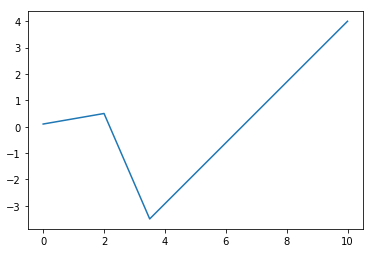
A bpf with linear interpolation
from bpf4 import *
a = core.Linear([0, 2, 3.5, 10], [0.1, 0.5, -3.5,  4])
a.plot()
Summary
| Method | Description |
|---|---|
| init | - |
| flatpairs | Returns a flat 1D array with x and y values interlaced |
| integrate_between | Integrate this bpf between the given x coords |
| inverted | Return a new Linear bpf where x and y coordinates are inverted. |
| simplify | Simplify this bpf |
| sliced | Cut this bpf at the given points |
Methods
__init__
def __init__(xs: ndarray, ys: ndarray) -> None
Args
- xs (
ndarray): the x-coord data - ys (
ndarray): the y-coord data
flatpairs
Linear.flatpairs(self)
Returns a flat 1D array with x and y values interlaced
>>> a = linear(0, 0, 1, 10, 2, 20)
>>> a.flatpairs()
array([0, 0, 1, 10, 2, 20])
Returns
(ndarray) A 1D array representing the points of this bpf with xs and ys interleaved
integrate_between
Linear.integrate_between(self, double x0, double x1, size_t N=0) -> double
Integrate this bpf between the given x coords
Args
- x0 (
float): start of integration - x1 (
float): end of integration - N (
int): number of integration steps (default:0)
Returns
(float) The result representing the area beneath the curve between x0 and x1
inverted
Linear.inverted(self)
Return a new Linear bpf where x and y coordinates are inverted.
This is only possible if y never decreases in value. Otherwise
a ValueError is thrown
Returns
(Linear) The inverted bpf
simplify
Linear.simplify(self, threshold=0., ratio=0.) -> Linear
Simplify this bpf
Either threshold or ratio must be given, but not both
Args
- threshold (
float): the simplification threshold (default:0.0) - ratio (
float): the simplification ratio. If given, simplification is done by ratio, the higher this value the more the shape is simplified (default:0.0)
Returns
(Linear) a new Linear bpf with its points simplified by the given parameter. Notice that the start and end points are never simplified
sliced
Linear.sliced(self, double x0, double x1) -> Linear
Cut this bpf at the given points
If needed it inserts points at the given coordinates to limit this bpf to
the range x0:x1.
NB: this is different from crop, which is just a "view" into the underlying
bpf. In this case a real Linear bpf is returned.
Args
- x0 (
float): start x to cut - x1 (
float): end x to cut
Returns
(Linear) Copy of this bpf cut at the given x-coords
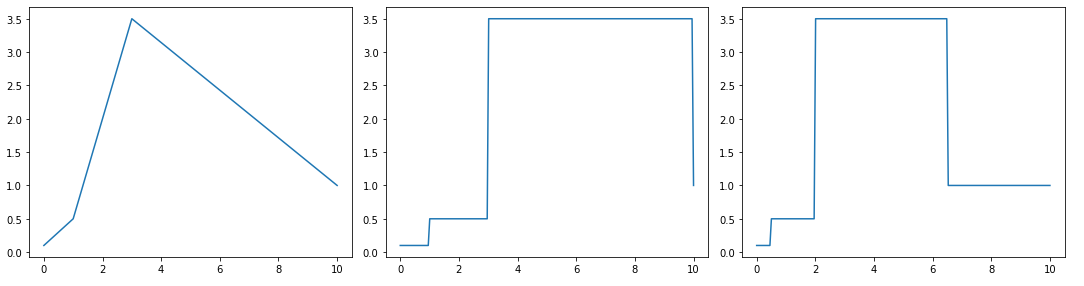
Nearest
- Base Class: BpfBase
Nearest(xs, ys)
A bpf with nearest interpolation
a = core.Linear([0, 1, 3, 10], [0.1, 0.5, 3.5,  1])
b = core.NoInterpol(*a.points())
c = core.Nearest(*a.points())
fig, axes = plt.subplots(1, 3, figsize=(15, 4), tight_layout=True)
a.plot(axes=axes[0], show=False)
b.plot(axes=axes[1], show=False)
c.plot(axes=axes[2])
Summary
| Method | Description |
|---|---|
| init | A bpf with nearest interpolation |
Methods
__init__
def __init__(xs: ndarray, ys: ndarray) -> None
A bpf with nearest interpolation
Args
- xs (
ndarray): the x coord data - ys (
ndarray): the y coord data
NoInterpol
- Base Class: BpfBase
NoInterpol(xs, ys)
A bpf without interpolation
a = core.Linear([0, 1, 3, 10], [0.1, 0.5, 3.5,  1])
b = core.NoInterpol(*a.points())
c = core.Nearest(*a.points())
fig, axes = plt.subplots(1, 3, figsize=(15, 4), tight_layout=True)
a.plot(axes=axes[0], show=False)
b.plot(axes=axes[1], show=False)
c.plot(axes=axes[2])
Summary
| Method | Description |
|---|---|
| init | A bpf without interpolation |
Methods
__init__
def __init__(xs: ndarray, ys: ndarray) -> None
A bpf without interpolation
Args
- xs (
ndarray): the x coord data - ys (
ndarray): the y coord data
Smooth
- Base Class: BpfBase
Smooth(xs, ys, int numiter=1)
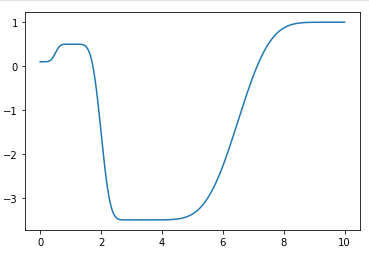
A bpf with smoothstep interpolation.
>>> a = Smooth([0, 1, 3, 10], [0.1, 0.5, -3.5,  1])
>>> a.plot()
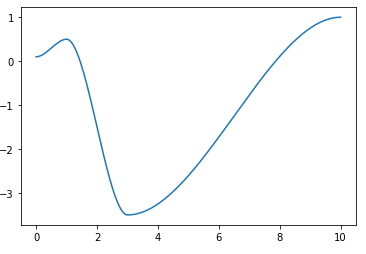
>>> a = core.Smooth([0, 1, 3, 10], [0.1, 0.5, -3.5,  1], numiter=3)
>>> a.plot()
Summary
| Method | Description |
|---|---|
| init | - |
Methods
__init__
def __init__(xs: ndarray, ys: ndarray, numiter: int) -> None
Args
- xs (
ndarray): the x-coord data - ys (
ndarray): the y-coord data - numiter (
int): the number of smoothstep steps
Smoother
- Base Class: BpfBase
Smoother(xs, ys)
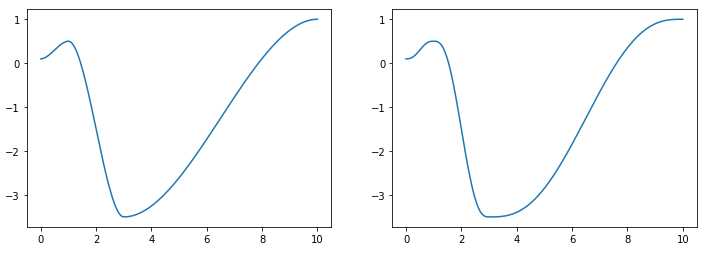
A bpf with smootherstep interpolation (perlin's variation of smoothstep)
a = core.Smooth([0, 1, 3, 10], [0.1, 0.5, -3.5,  1])
b = core.Smoother(*a.points())
fig, axes = plt.subplots(1, 2, figsize=(12, 4))
a.plot(axes=axes[0], show=False)
b.plot(axes=axes[1])
Const
- Base Class: BpfInterface
Const(double value, tuple bounds: tuple[float, float] = None)
A bpf representing a constant value
Summary
| Method | Description |
|---|---|
| init | - |
| mapn_between | Const.mapn_between(self, int n, double x0, double x1, ndarray out=None) -> ndarray |
Methods
__init__
def __init__(value: float) -> None
Args
- value (
float): the constant value of this bpf
mapn_between
def mapn_between(self, n, x0, x1, out=None) -> None
Const.mapn_between(self, int n, double x0, double x1, ndarray out=None) -> ndarray
Args
- n:
- x0:
- x1:
- out: (default:
None)
Multi
- Base Class: BpfInterface
Multi(xs, ys, interpolations)
A bpf where each segment can have its own interpolation kind
Summary
| Method | Description |
|---|---|
| init | !!! note |
| segments | Returns an iterator over the segments of this bpf |
Methods
__init__
def __init__(xs: ndarray, ys: ndarray, interpolations: list[str]) -> None
Note
Note
len(interpolations) == len(xs) - 1
The interpelation is indicated via a descriptor: 'linear' (linear), 'expon(x)'
(exponential with exp=x), 'halfcos', 'halfcos(x)' (cosine interpol with exp=x),
'nointerpol', `'smooth' (smoothstep)
Args
- xs (
ndarray): the sequence of x points - ys (
ndarray): the sequence of y points - interpolations (
list[str]): the interpolation used between these points
segments
Multi.segments(self)
Returns an iterator over the segments of this bpf
Returns
(Iterator[tuple[float, float, str, float]]) An iterator of segments, where each segment has the form (x, y, interpoltype:str, exponent)
Sampled
- Base Class: BpfInterface
Sampled(samples, double dx, double x0=0, unicode interpolation=u'linear')
A bpf with regularly sampled data
When evaluated, values between the samples are interpolated with a given function: linear, expon(x), halfcos, halfcos(x), etc.
Summary
| Property | Description |
|---|---|
| dx | Sampled.dx: float |
The sampling period (delta x) |
| interpolation | - | | samplerate | Sampled.samplerate: float
The samplerate of this bpf |
| xs | Sampled.xs: numpy.ndarray
The x-coord array of this bpf |
| ys | - |
| Method | Description |
|---|---|
| init | - |
| aslinear | A linear version of this bpf |
| derivative | Return a curve which represents the derivative of this curve |
| flatpairs | Returns a flat 1D array with x and y values interlaced |
| integrate | Return the result of the integration of this bpf. |
| integrate_between | The same as integrate() but between the (included) bounds x0-x1 |
| inverted | Return a view on this bpf with the coords inverted |
| mapn_between | Return an array of n elements resulting of evaluating this bpf regularly |
| points | Returns a tuple with the points defining this bpf |
| segments | Returns an iterator over the segments of this bpf |
| set_interpolation | Sets the interpolation of this Sampled bpf, inplace |
| split | Split this Sampled bpf into fragments separated by nan y values |
Attributes
- dx: Sampled.dx: float The sampling period (delta x)
- interpolation
- samplerate: Sampled.samplerate: float The samplerate of this bpf
- xs: Sampled.xs: numpy.ndarray The x-coord array of this bpf
- ys
Methods
__init__
def __init__(samples: ndarray, dx: float, x0: float, interpolation: str) -> None
Args
- samples (
ndarray): the y-coord sampled data - dx (
float): the sampling period - x0 (
float): the first x-value - interpolation (
str): the interpolation function used. One of 'linear', 'nointerpol', 'expon(X)', 'halfcos', 'halfcos(X)', 'smooth', 'halfcosm', etc.
aslinear
Sampled.aslinear(self, simplify=0.)
A linear version of this bpf
Args
- simplify (
float): (default:0.0)
derivative
Sampled.derivative(self) -> BpfInterface
Return a curve which represents the derivative of this curve
It implements Newtons difference quotiont, so that:
derivative(x) = bpf(x + h) - bpf(x)
                -------------------
                          h
Example
>>> from bpf4 import *
>>> a = slope(1)[0:6.28].sin()
>>> a.plot(show=False, color="red")
>>> b = a.derivative()
>>> b.plot(color="blue")
flatpairs
Sampled.flatpairs(self)
Returns a flat 1D array with x and y values interlaced
>>> a = linear(0, 0, 1, 10, 2, 20)
>>> a.flatpairs()
array([0, 0, 1, 10, 2, 20])
Returns
(ndarray) A 1D array with x and y values interlaced
integrate
Sampled.integrate(self) -> double
Return the result of the integration of this bpf.
If any of the bounds is inf, the result is also inf.
NB: to determine the limits of the integration, first crop the bpf via a slice
Example
Integrate this bpf from its lower bound to 10 (inclusive)
b[:10].integrate()
integrate_between
Sampled.integrate_between(self, double x0, double x1, size_t N=0) -> double
The same as integrate() but between the (included) bounds x0-x1
It is effectively the same as bpf[x0:x1].integrate(), but more efficient
NB: N has no effect. It is put here to comply with the signature of the function.
Args
- x0:
- x1:
- N (
int): (default:0)
inverted
Sampled.inverted(self)
Return a view on this bpf with the coords inverted
In an inverted function the coordinates are swaped: the inverted version of a bpf indicates which x corresponds to a given y
Returns None if the function is not invertible. For a function to be invertible, it must be strictly increasing or decreasing, with no local maxima or minima.
f.inverted()(f(x)) = x
So if y(1) == 2, then y.inverted()(2) == 1
Returns
(BpfInterface) a view on this bpf with the coords inverted
mapn_between
Sampled.mapn_between(self, int n, double x0, double x1, ndarray out=None) -> ndarray
Return an array of n elements resulting of evaluating this bpf regularly
The x coordinates at which this bpf is evaluated are equivalent to linspace(xstart, xend, n)
Args
- n (
int): the number of elements to generate - x0 (
float): x to start mapping - x1 (
float): x to end mapping - out (
ndarray): if given, result is put here (default:None)
Returns
(ndarray) An array of this bpf evaluated at a grid [xstart:xend:dx], where dx is (xend-xstart)/n
points
Sampled.points(self)
Returns a tuple with the points defining this bpf
Example
>>> b = Linear.fromseq(0, 0, 1, 100, 2, 50)
>>> b.points()
([0, 1, 2], [0, 100, 50])
Returns
(tuple[ndarray, ndarray]) A tuple (xs, ys) where xs is an array holding the values for the x coordinate, and ys holds the values for the y coordinate
segments
Sampled.segments(self)
Returns an iterator over the segments of this bpf
Each item is a tuple (float x, float y, str interpolation_type, float exponent)
NB: exponent is only relevant if the interpolation type makes use of it
Returns
(Iterable[tuple[float, float, str, float]]) An iterator of segments, where each segment has the form (x, y, interpoltype:str, exponent)
set_interpolation
Sampled.set_interpolation(self, unicode interpolation) -> Sampled
Sets the interpolation of this Sampled bpf, inplace
Returns self, so you can do:
sampled = bpf[x0:x1:dx].set_interpolation('expon(2)')
Args
- interpolation (
str): the interpolation kind
Returns
(Sampled) self
split
Sampled.split(self, double sep=NAN)
Split this Sampled bpf into fragments separated by nan y values
Args
- sep (
float): the separator to use (default:nan)
Returns
(list[Sampled]) A list of fragments
Slope
- Base Class: BpfInterface
Slope(double slope, double offset=0, tuple bounds=None)
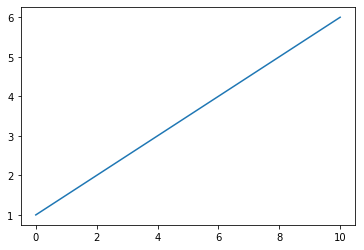
A bpf representing a linear equation y = slope * x + offset
>>> from bpf4.core import *
>>> a = Slope(0.5, 1)
>>> a
Slope[-inf:inf]
>>> a[0:10].plot()
Summary
| Property | Description |
|---|---|
| offset | offset: 'double' |
| slope | slope: 'double' |
| Method | Description |
|---|---|
| init | A bpf representing a linear equation y = slope * x + offset |
| mapn_between | Return an array of n elements resulting of evaluating this bpf regularly |
Attributes
- offset: offset: 'double'
- slope: slope: 'double'
Methods
__init__
def __init__(slope: float, offset: float, bounds: tuple) -> None
A bpf representing a linear equation y = slope * x + offset
Args
- slope (
float): the slope of the line - offset (
float): an offset added - bounds (
tuple): if given, the line is clipped on the x axis to the given bounds
mapn_between
Slope.mapn_between(self, int n, double x0, double x1, ndarray out=None) -> ndarray
Return an array of n elements resulting of evaluating this bpf regularly
The x coordinates at which this bpf is evaluated are equivalent to linspace(x0, 1, n)
Args
- n (
int): the number of elements to generate - x0 (
float): x to start mapping - x1 (
float): x to end mapping - out (
ndarray): if given, result is put here (default:None)
Returns
(ndarray) An array of this bpf evaluated at a grid [x0:x1:dx], where dx is (xend-xstart)/n
Spline
- Base Class: BpfInterface
Spline(xs, ys)
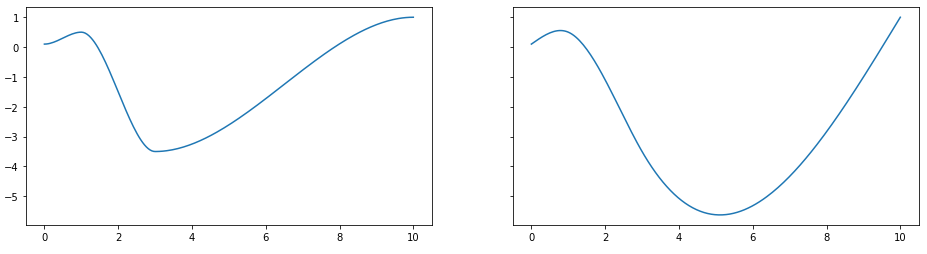
A bpf with cubic spline interpolation
With cubic spline interpolation, for each point (x, y)
it is ensured that bpf(x) == y. Between the defined points,
depending on their proximity, this bpf can overshoot
Example
a = core.Smooth([0, 1, 3, 10], [0.1, 0.5, -3.5,  1])
b = core.Spline(*a.points())
fig, axes = plt.subplots(1, 2, figsize=(12, 4))
a.plot(axes=axes[0], show=False)
b.plot(axes=axes[1])
Summary
| Method | Description |
|---|---|
| init | A bpf with cubic spline interpolation |
| points | Returns a tuple with the points defining this bpf |
| segments | Returns an iterator over the segments of this bpf |
Methods
__init__
def __init__(xs: ndarray, ys: ndarray) -> None
A bpf with cubic spline interpolation
Args
- xs (
ndarray): the x coord data - ys (
ndarray): the y coord data
points
Spline.points(self)
Returns a tuple with the points defining this bpf
Example
>>> b = Linear.fromseq(0, 0, 1, 100, 2, 50)
>>> b.points()
([0, 1, 2], [0, 100, 50])
Returns
(tuple[ndarray, ndarray]) a tuple (xs, ys) where xs is an array holding the values for the x coordinate, and ys holds the values for the y coordinate
segments
Spline.segments(self)
Returns an iterator over the segments of this bpf
Each segment is a tuple (float x, float y, str interpolation_type, float exponent)
Note
Exponent is only relevant if the interpolation type makes use of it
Returns
(Iterable[tuple[float, float, str, float]]) An iterator of segments, where each segment has the form (x, y, interpoltype:str, exponent)
USpline
- Base Class: BpfInterface
USpline(xs, ys)
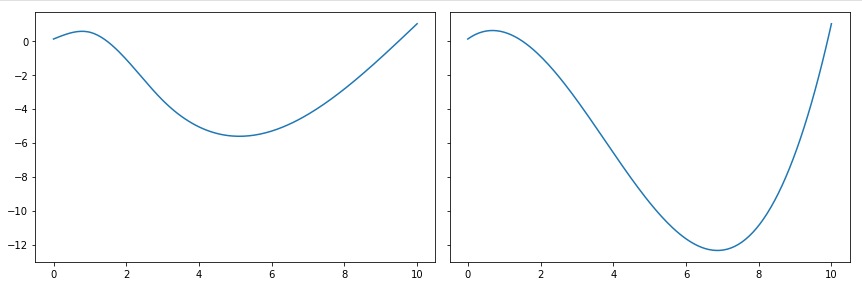
bpf with univariate spline interpolation.
a = core.Spline([0, 1, 3, 10], [0.1, 0.5, -3.5,  1])
b = core.USpline(*a.points())

fig, axes = plt.subplots(1, 2, figsize=(12, 4), sharey=True, tight_layout=True)
a.plot(axes=axes[0], show=False)
b.plot(axes=axes[1])
Summary
| Method | Description |
|---|---|
| init | - |
| map | USpline.map(self, xs, ndarray out=None) -> ndarray |
| mapn_between | Return an array of n elements resulting of evaluating this bpf regularly |
| segments | Returns an iterator over the segments of this bpf |
Methods
__init__
def __init__(xs: ndarray, ys: ndarray) -> None
Args
- xs (
ndarray): the x coord data - ys (
ndarray): the y coord data
map
def map(self, xs, out=None) -> None
USpline.map(self, xs, ndarray out=None) -> ndarray
Args
- xs:
- out: (default:
None)
mapn_between
USpline.mapn_between(self, int n, double x0, double x1, ndarray out=None) -> ndarray
Return an array of n elements resulting of evaluating this bpf regularly
The x coordinates at which this bpf is evaluated are equivalent to linspace(x0, x1, n)
Args
- n (
int): the number of elements to generate - x0 (
float): x to start mapping - x1 (
float): x to end mapping - out (
ndarray): if given, result is put here (default:None)
Returns
(ndarray) An array of this bpf evaluated at a grid [xstart:xend:dx], where dx is (xend-xstart)/n
segments
USpline.segments(self)
Returns an iterator over the segments of this bpf
Returns
(Iterable[tuple[float, float, str, float]]) An iterator of segments, where each segment has the form (x, y, interpoltype:str, exponent)
_BpfUnaryOp
- Base Class: BpfInterface
_BpfUnaryOp(BpfInterface a)
A bpf representing a unary operation on a bpf
Summary
| Method | Description |
|---|---|
| map | the same as map(self, xs) but somewhat faster |
| mapn_between | _BpfUnaryOp.mapn_between(self, int n, double x0, double x1, ndarray out=None) -> ndarray |
Methods
map
_BpfUnaryOp.map(self, xs, ndarray out=None) -> ndarray
the same as map(self, xs) but somewhat faster
xs can also be a number, in which case it is interpreted as the number of elements to calculate in an evenly spaced grid between the bounds of this bpf. bpf.map(10) == bpf.map(numpy.linspace(x0, x1, 10)) ( this is the same as bpf.mapn_between(10, bpf.x0, bpf.x1) )
Args
- xs:
- out: (default:
None)
mapn_between
def mapn_between(self, n, x0, x1, out=None) -> None
_BpfUnaryOp.mapn_between(self, int n, double x0, double x1, ndarray out=None) -> ndarray
Args
- n:
- x0:
- x1:
- out: (default:
None)
NanMask
- Base Class: _BpfUnaryOp
NanMask(BpfInterface a, double masked=0.)
_MultipleBpfReduce
- Base Class: _MultipleBpfs
Summary
| Method | Description |
|---|---|
| mapn_between | _MultipleBpfReduce.mapn_between(self, int n, double x0, double x1, ndarray out=None) -> ndarray |
Methods
mapn_between
def mapn_between(self, n, x0, x1, out=None) -> None
_MultipleBpfReduce.mapn_between(self, int n, double x0, double x1, ndarray out=None) -> ndarray
Args
- n:
- x0:
- x1:
- out: (default:
None)
Max
- Base Class: _MultipleBpfReduce
Max(*bpfs)
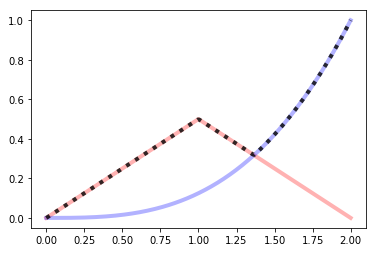
A bpf which returns the max of multiple bpfs at a given point
a = linear(0, 0, 1, 0.5, 2, 0)
b = expon(0, 0, 2, 1, exp=3)
a.plot(show=False, color="red", linewidth=4, alpha=0.3)
b.plot(show=False, color="blue", linewidth=4, alpha=0.3)
core.Max((a, b)).plot(color="black", linewidth=4, alpha=0.8, linestyle='dotted')
Min
- Base Class: _MultipleBpfReduce
Min(*bpfs)
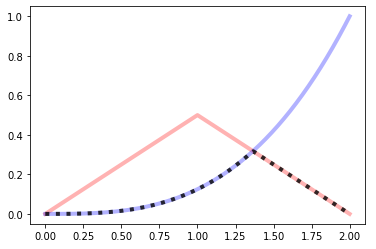
A bpf which returns the min of multiple bpfs at a given point
a = linear(0, 0, 1, 0.5, 2, 0)
b = expon(0, 0, 2, 1, exp=3)
a.plot(show=False, color="red", linewidth=4, alpha=0.3)
b.plot(show=False, color="blue", linewidth=4, alpha=0.3)
core.Min((a, b)).plot(color="black", linewidth=4, alpha=0.8, linestyle='dotted')
_MultipleBpfs
- Base Class: BpfInterface
_MultipleBpfs(bpfs)
Stack
- Base Class: _MultipleBpfs
Stack(bpfs)
A bpf representing a stack of bpf
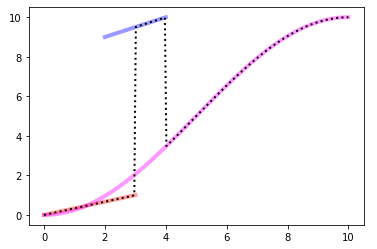
Within a Stack, a bpf does not have outbound values. When evaluated outside its bounds the bpf below is used, iteratively until the lowest bpf is reached. Only the lowest bpf is evaluated outside its bounds
Example
# Interval    bpf
# [0, 3]      a
# (3, 4]      b
# (4, 10]     c

from bpf4 import *
import matplotlib.pyplot as plt

a = linear(0, 0, 3, 1)
b = linear(2, 9, 4, 10)
c = halfcos(0, 0, 10, 10)
s = core.Stack((a, b, c))

ax = plt.subplot(111)
a.plot(color="#f00", alpha=0.4, axes=ax, linewidth=4, show=False)
b.plot(color="#00f", alpha=0.4, axes=ax, linewidth=4, show=False)
c.plot(color="#f0f", alpha=0.4, axes=ax, linewidth=4, show=False)
s.plot(axes=ax, linewidth=2, color="#000", linestyle='dotted')
Summary
| Method | Description |
|---|---|
| init | - |
Methods
__init__
def __init__(bpfs: list|tuple) -> None
Args
- bpfs (
list|tuple): A sequence of bpfs. The order defined the evaluation order. The first bpf is on top, the last bpf is on bottom. Only the last bpf is evaluated outside its bounds
blend
blend(a, b, mix=0.5) -> BpfInterface
Blend these BPFs
Note
if mix == 0: the result is a if mix == 1: the result is b
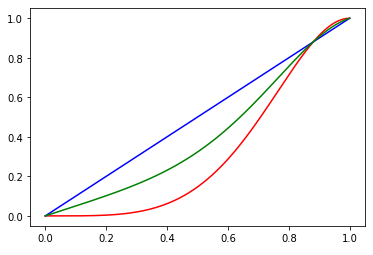
Example
Create a curve which is in between a halfcos and a linear interpolation
from bpf4 import *
a = halfcos(0, 0, 1, 1, exp=2)
b = linear(0, 0, 1, 1)
c = blend(a, b, 0.5)

a.plot(show=False, color="red")
b.plot(show=False, color="blue")
c.plot(color="green")
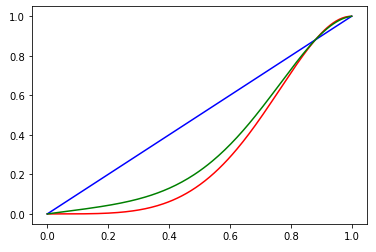
Closer to halfcos
c = blend(a, b, 0.2)
a.plot(show=False, color="red")
b.plot(show=False, color="blue")
c.plot(color="green")
Args
- a (
BpfInterface): first bpf - b (
BpfInterface): second bpf - mix (
float): how to mix the bpfs. Can be fixed or itself a bpf (or any function) returning a value between 0-1 (default:0.5)
Returns
(BpfInterface) The blended bpf
bpf_zero_crossings
bpf_zero_crossings(BpfInterface b, double h=0.01, int N=0, double x0=NAN, double x1=NAN, int maxzeros=0) -> list
Return the zeros if b in the interval defined
Args
- b (
BpfInterface): a bpf - h (
float): the interval to scan for zeros. for each interval only one zero will be found (default:0.01) - N (
int): alternatively you can give the number of intervals to scan. h will be calculated from N (the h parameter is not used) (default:0) - x0 (
float): If given, the bounds to search within (default:nan) - x1 (
float): If given, the bounds to search within (default:nan) - maxzeros (
int): if given, search will stop if this number of zeros is found (default:0)
Returns
(List[float]) A list of zeros (x coord points where the bpf is 0)
brentq
brentq(bpf, double x0, double xa, double xb, double xtol=9.9999999999999998e-13, double rtol=4.4408920985006262e-16, max_iter=100)
Calculate the zero of bpf + x0 in the interval (xa, xb) using brentq algorithm
Note
To calculate all the zeros of a bpf, use .zeros()
Example
# calculate the x where a == 0.5
>>> from bpf4 import *
>>> a = linear(0, 0, 10, 1)
>>> xzero, numcalls = brentq(a, -0.5, 0, 1)
>>> xzero
5
Args
- bpf (
BpfInterface): the bpf to evaluate - x0 (
float): an offset so that bpf(x) + x0 = 0 - xa (
float): the starting point to look for a zero - xb (
float): the end point - xtol (
float): The computed root x0 will satisfy np.allclose(x, x0, atol=xtol, rtol=rtol) (default:1e-12) - rtol (
float): The computed root x0 will satisfy np.allclose(x, x0, atol=xtol, rtol=rtol) (default:4.440892098500626e-16) - max_iter (
int): the max. number of iterations (default:100)
Returns
(tuple[float, int]) A tuple (zero of the bpf, number of function calls)
setA4
setA4(double freq)
Set the reference freq used
Args
- freq (
float): the reference frequency for A4